Saturday, August 25, 2012

Making Sense of the Whole Delphi WinRT Thing

I'm not one of the "Low-Level" "Deep-Inside" Delphi smart guys. I'm just an average software developer who uses Delphi to create simple applications I sell to other average people. Oh, I learn a lot hanging around the smart guys but I seem to get lost when the discussions and comments take a deep dive.

It's no doubt that Allen Bauer's post created quite a stir around the community and the new release of XE3. I've tried to make sense of all the buzz going back and forth but at one point it just got way over my head.

Since I am just a Micro-ISV, I am looking for a simplistic answer to what this whole Delphi - WinRT crap is all about and I think I have figured it out.

I posted this on the Delphi Developer group on Facebook:
I've been trying to follow all the talk about what is going on with Delphi and WinRT ever since Allen Bauer's post went viral. I'm not as smart as most of you Delphi guys. Can someone please explain in very simplistic terms what it means when Delphi either can't or is excluded from creating WinRT apps? How does this effect a Micro-ISV like myself in terms of distribution and sales?
I received this response...
For example, you will probably not be able to sell your app through the MS Application Store, which could really hurt your exposure to prospective new customers.
Okay. So I started googling Microsoft App Store and discovered a couple interesting tidbits.

I started off reading a post by George Ou called ARM Battery Life Advantage Myth Lives On

This lead me to a post by Steven Sinofsky called Collaborating to deliver Windows RT PCs

Which lead me to another post by Steven Sinofsky called Building Windows for the ARM processor architecture

Here is what I think is going on and how it effects me and you who sell software to the average consumer.


Microsoft is leading a push to compete directly with the iPad. So, Microsoft invented a new operating system called WOA or Windows on ARM which in my opinion is a Reduced Instruction Set Computer. This new operating system is a subset of Windows 8 and will be available on the new WinRT PC's soon to be released.

It sounds like WinRT PC's (I'd prefer they were called tablets) are a separate line of personal computers designed to compete directly with the iPad market. No disk drive, no expansion slots, one or two USB ports and completely mobile. Which requires a long life battery, hence the first post I sited above. These devices will be RISC (Reduced Instruction Set Computers) running the WOA which includes WinRT. This limits the applications to only those applications that conform to the WinRT subset of instructions.

All other Non-WinRT PC's will come with a full blown Windows 8 OS in addition to the scaled down WOA running WinRT. This lets you run all the currently developed Windows Applications (those created using Delphi) and any of the new applications that conform to the WinRT subset of instructions.

What does all this mean to you and I...


Given that the WinRT PC's (I'd prefer they were called tablets) have a subset of the real Windows 8 OS, the only way to install software on these machines will be through the use of the Microsoft App Store. Since Microsoft controls this store they will make sure that any app in the store will run without problems on the new WinRT machines.

The bottom line, we (Delphi developers) will still have a huge user base availabe to us. Not everyone will flock to these new WinRT PC's (I'd prefer they were called tablets). When EMBT finally does get the details worked out and makes it available to us... we can retool, recompile and look forward to a windfall of new WinRT customers.

Enjoy - Semper Fi
Gunny Mike

Thursday, August 23, 2012

Priceless: Behind the Code with Anders Hejlsberg

I just watched this interview with Anders Hejlsberg for the first time. This is truly an amazing interview. It's rather long, about 1 hour, but it is so worth it. I'm not giving anything away... you'll have to just watch and enjoy.


Enjoy - Semper Fi
Gunny Mike

Tuesday, August 7, 2012

Raize Components Makes Id/Value Pair Logic A Breeze

I have known about Raize Components for a long time. The buzz I've always heard was something like this... "Oh yeah, Raize is good if you want a nice consistent look to all of your components within your program."

That's not really very exciting when you are thinking about spending $400.

Then I watched a video from Code Rage 5 where Ray demonstrates and talks about his components. Wow, did this change my mind. I purchased Raize Components 6.0 three days later. Here is the Code Rage 5 video I'm talking about UI Design with Raize Components.

There's also an XE2 Code Rage 6 video UI Design with Raize Components and RAD Studio XE2

You owe it to yourself to watch one or both of these videos.

Anyway, I have a passion for using Id/Value pairs in all of my lookup code. I find it much easier to pass around an integer Id instead of the actual string value. I guess this comes from years of creating databases with lookup tables based on nonsensical auto-increment Id's.  For example:

tblColors
IdValue
1Blue
2Green
3Red
4Yellow

So, I was very excited when I learned that the TRzComboBox component from Raize supports Id/Value Pairs.  You just right click on the control, choose Edit Items & Values and enter your Id value pairs.
 
When you want to retrieve the Value associated with the ItemIndex of the control you simply reference the TRzComboBox.Value property.

Okay that was the easy part. Now how do you go about doing the opposite, setting the control so the ItemIndex refletcs the Id value? That's a good question.

Suppose we have the value 7 which represents "Seven" stored in an interger variable and we want to set the control so that Seven is the highlighted item.


You simply iterate through the control testing each of the values to see if it matches. Upon a match you set the ItemIndex.

Raize makes this easy beacause it exposes both the Value property and the Values property. Value corresponds to the ItemIndex and Values is a TStringList of all the values.

Below is a simple little program to demonstrate how to do set the ItemIndex to the Value. It does require Raize Componets 6.0 from http://www.raize.com/

The key is a little helper procedure that accepts two parameters. The first is a TRzComboBox, and the second is the Id value. By passing the TRzComboBox by reference it allows any changes to the ItemIndex to happen directly to the control itself.

Procedure SetComboBoxValue(var cb:TRzComboBox; x:integer);
var i :integer;
begin
  for i := 0 to cb.Count - 1 do
    if x = StrToInt(cb.Values[i]) then
    begin
      cb.ItemIndex := i;
      Exit;
    end;
end;
As you can see, it simply iterates through the list of values looking for a match and when found it Exits.

Enjoy,
Semper Fi - Gunny Mike

 UPDATE 08/08/2012  9:25 PM EST

I just received an email from Ray Konopka regarding TRzComboBox.Value property. It turns out that the Value property is a read/write property. That means you can assign a value to the Value property and it will change the ItemIndex property automatically! How simple is that...

RzComboBox1.Value := IntToStr(7);

Thanks Ray and keep up the great work.


object Form1: TForm1
  Left = 0
  Top = 0
  Caption = 'Form1'
  ClientHeight = 203
  ClientWidth = 226
  Color = clBtnFace
  Font.Charset = DEFAULT_CHARSET
  Font.Color = clWindowText
  Font.Height = -11
  Font.Name = 'Tahoma'
  Font.Style = []
  OldCreateOrder = False
  PixelsPerInch = 96
  TextHeight = 13
  object RzButton1: TRzButton
    Left = 64
    Top = 112
    Width = 110
    Caption = 'Value = 1'
    TabOrder = 0
    OnClick = RzButton1Click
  end
  object RzComboBox1: TRzComboBox
    Left = 64
    Top = 32
    Width = 110
    Height = 21
    TabOrder = 1
    Text = 'One'
    OnChange = RzComboBox1Change
    Items.Strings = (
      'One'
      'Two'
      'Three'
      'Four'
      'Five'
      'Six'
      'Seven'
      'One Hundred'
      'Nine Nine Nine')
    ItemIndex = 0
    Values.Strings = (
      '1'
      '2'
      '3'
      '4'
      '5'
      '6'
      '7'
      '100'
      '999')
  end
end

unit SetComboBox;

interface

uses
  Windows, Messages, SysUtils, Variants, Classes, Graphics, Controls, 
  Forms, Dialogs, StdCtrls, RzCmboBx, RzButton;

type
  TForm1 = class(TForm)
    RzButton1: TRzButton;
    RzComboBox1: TRzComboBox;
    procedure RzButton1Click(Sender: TObject);
    procedure RzComboBox1Change(Sender: TObject);
  private
    { Private declarations }
  public
    { Public declarations }
  end;

  Procedure SetComboBoxValue(var cb:TRzComboBox; x:integer);
var
  Form1: TForm1;

implementation

{$R *.dfm}

Procedure SetComboBoxValue(var cb:TRzComboBox; x:integer);
var i :integer;
begin
  for i := 0 to cb.Count - 1 do
    if x = StrToInt(cb.Values[i]) then
    begin
      cb.ItemIndex := i;
      Exit;
    end;
end;

procedure TForm1.RzButton1Click(Sender: TObject);
var
  i,j : integer;
begin
  i := Random(RzComboBox1.Count);
  j := StrToInt(RzComboBox1.Values[i]);
  RzButton1.Caption := 'Value = ' + IntToStr(j);
  SetComboBoxValue(RzComboBox1,j);
end;

procedure TForm1.RzComboBox1Change(Sender: TObject);
begin
  RzButton1.Caption := 'Value = ' + RzComboBox1.Value;
end;

end.

Saturday, July 7, 2012

How to deal with Programmer's Block

Eventually, we all go through a bout of Programmer's Block. What is Programmer's Block? It's very similar to Writer's Block except it happens to programmers.

I have been struggling for a very long time with Programmer's Block and didn't realize it. I knew what I wanted to do (vaguely) but just couldn't get things off to a good start. For me, it was the big picture... I could not see the big picture.

I started playing around with the little pieces. I worked on the tiny algorithms knowing I would fit them in somehow... but I just didn't have that aha, big picture moment. And then...

I posted this question on P.SE "How do you get past the Analysis to Paralysis when working on a new project?" and within 3 minutes it received 1 down vote and 1 vote to close. I was not happy. I'm thinking great... even the people on P.SE are not going to help. (try this link instead)

Soon I got some great feedback. I'm not going to repeat it all here... don't think I could. Might be copyright violation. So, you'll just have to read it there. Make sure to read the comments... there's some really good stuff in them.

I love yellow stickies.

This post is dedicated to all of you who have or will go through "Programmers Block".

Special thanks to:
haylem & Thorbjørn Ravn Andersen

Enjoy! Semper Fi
Gunny Mike

Sunday, July 1, 2012

Restoring Quick Config on a TMS AdvStringGrid

I recently purchased the TMS Component Pack mainly because of the grid capabilities TMS offers over Delphi's native grid. So I started playing around with the grid and flipping things on and off to see how the grid would be affected.

I was playing around with the "Set Look" option of the Quick Config. I tried out every option and settled on Windows XP. Then I clicked the little X in the red box and ... poof it was gone. No more Quick Config. I spent the next three hours trying to figure out how to turn it back on.

Property ShowDesignerHelp determines wether the "Quick Config" is on or off. Geez, I was looking for a property called "QuickConfig"... no wonder I couldn't find it.

Semper Fi,
Gunny Mike


Sunday, June 10, 2012

Rounding the Currency type like they taught us in school

I started using Delphi's Currency type for it's accuracy only to discover it doesn't round the way I would have expected it to round. I remember being taught in school that when rounding numbers if the remainder was equal to or greater than five you round up otherwise you round down.

For Example:
  • 12.344 Rounds to 12.34
  • 12.345 Rounds to 12.35
  • 12.346 Rounds to 12.35
This is how I was taught in school.
This is how Microsoft Excel does it when you set the cell to display as two decimal places.
This is how Microsoft SQL does it when you format the display as two decimal places.

'---------------------------------
' Microsoft SQL
'---------------------------------
DECLARE @Money money
SET @Money = 12.345
SELECT CONVERT (varchar(10),@Money,1)
'---------------------------------
12.35
But that's not how Delphi does it.

'---------------------------------
' Delphi 2010
'---------------------------------
procedure TForm1.Button1Click(Sender: TObject);
var
  s : string;
  c : currency;
begin
  c := 12.345;
  s := '';
  s := s + 'Value ' + FloatToStr(c);
  s := s + Chr(13);
  s := s + Format('Formatted as money = %m',[c]);
  ShowMessage(s);
end;


So this lead me looking around for an answer. It appears that Delphi uses what is known as Bankers Rounding which means round to the closest even number. I was never taught this in school. This is how Bankers Rounding works:
  • 12.345 Rounds to 12.34
  • 12.355 Rounds to 12.36
  • 12.365 Rounds to 12.36
I do not want this type of rounding behavior... I want the rounding that I was taught in school. The problem is Delphi's internals do not support this type of rounding. (This is where I have one of those love hate realtionships with Delphi. I hate Delphi!)

So I posed a question on StackOverflow and after clarifying what I meant, got a couple interesting responses. Here is a solution I found reading through the Embarcadero discussion mentioned in my question on SO.
function RoundCurrency(const Value: Currency): Currency;
var
  V64: Int64 absolute Result;
  Decimals: Integer;
begin
  Result := Value;
  Decimals := V64 mod 100;
  Dec(V64, Decimals);
  case Decimals of
    -99 .. -50 : Dec(V64, 100);
    50 .. 99 : Inc(V64, 100);
  end;
end;

procedure TForm1.Button1Click(Sender: TObject);
var
  s : string;
  c : currency;
begin
  c := 12.345;
  s := '';
  s := s + 'Value ' + FloatToStr(c);
  s := s + Chr(13);
  s := s + Format('Formatted as money = %m',[c]);
  s := s + Chr(13);
  s := s + Chr(13);
  s := s + 'Using the RoundCurrency function';
  s := s + Chr(13);
  s := s + Format('Formatted as money = %m',[RoundCurrency(c)]);
  ShowMessage(s);
end;

Now that's more like it. I love Delphi!

Enjoy
Semper Fi - Gunny Mike

Sunday, May 13, 2012

Plan Ahead When It Comes To FireMonkey & iOS

I don't intend to move to XE2 or XE(next) anytime soon, I have my hands full just porting over my old applications from D5 to D2010. However, I would like to take advantage of FireMonkey and the iOS market when the time is right so I'm planning ahead and so can you.

I am currently working on adding Inifile support to my application to keep track of window sizes and position. I asked on StackOverflow if FireMonkey has anything similar to GetSystemMetrics. Whiler posted a snice snippet of code that uses FX.Platform. (Merci Beaucoup Whiler)

My first thought was it's too bad I can't use this piece of code today. Then I had one of those aha moments. I thought to myself,
"Why not add this as a comment in your Delphi code."
So that's what I did.

Begin Code Snippet
{
----------------------------------------------------------------
FireMonkey Consideration:
----------------------------------------------------------------
Question asked on stackoverflow:
http://stackoverflow.com/questions/10564505
I'm rewriting an old application using Delphi 2010 and I'd like
to put placeholders in my code for when I port it over to XE2.
Just curious if FireMonkey has an equivilent to GetSystemMetrics.
I'm specifically interested in:

GetSystemMetrics(SM_CXSCREEN)
GetSystemMetrics(SM_CYSCREEN)
----------------------------------------------------------------
If you just need the main monitor size, and not the desktop size
(n monitors sum), you can use this:

uses ..., FMX.Platform;

var   p: TPointF;
begin
  p := Platform.GetScreenSize;
  ShowMessage(Format('X: %f' + LineFeed + 'Y: %f', [p.X, p.Y]));

From: Whiler
http://blogs.wittwer.fr/whiler/
----------------------------------------------------------------
}
unit IniFileStuff;

interface

uses
  Windows, SysUtils, Forms, IniFiles;

type
  TScreenType  = (MainScreen, PreviewScreen);

Procedure InitializeIniFile();
Procedure ResetScreenSection(ScreenType:TScreenType);
Function WindowStateToInt(WSType:TWindowState):integer;
Function IntToWindowState(WSInt:integer):TWindowState;
...
End Code Snippet

So, even though I'm not using FireMonkey today, I've documented my code so when I do go to use FireMonkey I'll have a decent head start.

Don't keep it - Pass it on.
Semper Fi - Gunny Mike

Wednesday, May 9, 2012

Keeping Screen Resolution in Mind

I'm redoing an old Delph 5 app that forced a screen resolution of 640 x 480 on the users. At the time this application was deveopled that screen resolution was acceptable but not anymore. Todays endless arrays of screen resolutions brings on new challenges. One of the things I plan on doing at application start is interrogate the current screen resolution and set my application screen size to a ratio of 80%.

I'm amazed at how much information is available. Here is a nice graph that shows the top 10 screen resolutions in use from 2008 through 2012.


Source: http://gs.statcounter.com/#resolution-ww-monthly-201201-201301-bar


Add MultiMon to the uses clause The button click event lets you move the program between two monitors to get the screen resolution.
procedure TScreenResolution.Button1Click(Sender: TObject);
var
  MonInfo: TMonitorInfo;
  ScreenW, ScreenH : integer;
begin
  MonInfo.cbSize := SizeOf(MonInfo);
  GetMonitorInfo(MonitorFromWindow(Handle, MONITOR_DEFAULTTONEAREST), @MonInfo);
  ScreenW :=  MonInfo.rcMonitor.Right  - MonInfo.rcMonitor.Left;
  ScreenH :=  MonInfo.rcMonitor.Bottom - MonInfo.rcMonitor.Top;
  Label2.Caption := IntToStr(ScreenW);
  Label4.Caption := IntToStr(ScreenH);
end;
Semper Fi - Gunny Mike

FireMonkey Update - 05/13/2012:

I'd like to thank Whiler from StackOverflow for a FireMonkey example using FX.Platform:


Sunday, May 6, 2012

Print to File Options Supported by ReportBuilder

Wow, I'm really impressed with the out of the box, Print to File options that come with ReportBuilder. All you do is set the AllowPrintToFile to True and you are done!

The default Print to File option is PDF. But there are several others. The image formats create one image per page. The HTML option creates an *_htm_images folder for any images that might be on the report.


Image modifed to show all Type options

Print to File accepts the Page Range options as well. I even tried breaking it by printing page 3 of a 2 page report. No errors popped up and no output file was created.

I am extremely pleased with my purchase. ReportBuilder has proven to be everything I expected it to be and more.

Semper Fi - Gunny Mike


A Simple Way to Learn About Methods and Properties

I've decided this time around with Delphi, I'm going to do things as best as I possibly can. A long time ago I met Jeff Duntemann (here's his blog). If you know Jeff, you know he has an astounding vocabulary. I asked him about that once and he responded:
"Michael, the reason for my vocabulary is simple, my parents. When I asked for the definition of a particular word they told me to look it up in the dictionary. And while you are reading about that word, read about every word on both facing pages."
Jeff developed this habit when he was young and he still carrys it with him today. What a simple concept. I have decided to use this idea when I go looking up a the reference to a property or method of a Delph object. Not only am I going to read about the property I was intially interested in, I will read about all the other properties and methods.

Thank you Jeff, I finally figured out how to use your dictionary lookup idea!

Semper Fi - Gunny Mike

How to get the DBDemos Database into ElevatdDB

There are several Delphi tutorials out there that use the DBDemos database that ships with Delphi. I tend to learn much better if I actually perform the tasks outlined in these tutorials rather than just reading or viewing them. However, I'd much rather perform these tasks using ElevateDB, since this is the database I have chosen for all my new applications.

I started looking around to see if someone has done this already. I was looking for a .zip file out there in internet land. I posted to the ElevateDB support group hoping someone had a .zip file I could get my hands on. What I found was much more valuable.

One of the regulars, Roy, said why don't you just use the "built-in BDE migrator" that comes with ElevateDB.
This is one of the coolest things I have done with ElevateDB. I learned so much more going through this process then I would have if I simply downloaded some .zip off the internet.This whole process takes less than 5 minutes from start to finish. It looks very complicated but believe me it's not.

Step 1 - Create a Session Called DBDemos

Make sure you have the ElevateDB Manager up and running. Right-Click on ElevateDB Manager and then choose Create New Session

General Tab

There are two things that need to be done inside the General tab.
  1. Name:  DBDemos
  2. Description:  DBDemos database that ships with Delphi
DO NOT CLICK OK . . Switch to the Local tab

Local Tab

There are two things that need to be done inside the Local tab.
  1. File Folder:  Enter the location for configuration file for this session. Don't worry if this folder doesn't exist, it will get created for you later on.
  2. Large File Support:  Make sure this box is checked.
DO NOT CLICK OK . . Switch to the Login tab


Login Tab


There are three things that need to be done inside the Login tab.
  1. User Name: Administrator
  2. Password: Enter:  EDBDefault

  3. Confirm Password:  EDBDefault
NOW CLICK OK


Click Yes if prompted to create folder.

Step 2 - Create Database Migrators

Now we need to add the database Migrators that come with ElevateDB to the DBMemos session.

  • Expand the ElevateDB Manager by clicking on the + (Plus)
  • You will see the DBDemos session we just created
  • Expand the DBDemos session by clicking on the + (Plus)
  • Right-Click on DBDemos
  • Choose Create Database Migrators


Step 3 - Create an Empty DBDemos database

Now we need to add the database Migrators that come with ElevateDB to the DBMemos session.


  • Expand the ElevateDB Manager by clicking on the + (Plus)
  • Expand the DBDemos session by clicking on the + (Plus)
  • Right-Click on Databases
  • Choose Create New Database...


There are three things that need to be done on the General tab
  1. Name:DBDemos
  2. Description: DBDemos Database that ships with Delphi

  3. Folder: Enter the location where you want the database files to reside. In my example I simply use a DB folder in the same location as the session folder.
CLICK OK WHEN DONE

Click OK when Done

Step 4 - Migrate the DBDemos Database and Into ElevateDB

 We are almost done, this is the final step.

  • Expand ElevateDB Manager by clicking on the + (Plus)
  • Expand DBDemos session by clicking on the + (Plus)
  • Expand Databases by clicking on the + (Plus)
  • Right-Click on DBDemos database
  • Choose Migrate Database...


There are seven things that need to be done on the Migrate Database Source tab.
  1. Migrator: Choose BDE
  2. Ckeckbox: Make sure Include Table Data is checked
  3. Parameters Grid: Click DatabaseName to highlight the grid row
  4. Value: Enter DBDemos
  5. Click Set Paramter Value button
  6. Veify the Parameter Grid shows DBDemos for the DatabaseName
  7.  Click OK
 

Congratulations. You now have an ElevatdDB version of the DBDemos database you can use to follow along with all the Delphi tutorials out there.

Enjoy!

Semper Fi - Gunny Mike

Thursday, May 3, 2012

Rethinking the Use of Stored Procedures

As I mentioned in a previous post, I was absent from Delphi programming for about 7 years. During that time I worked 50-60 hours a week on custom database driven websites using ASP and Microsoft SQL Server. I estimate that this resulted in 200 (plus/minus) websites.

Programming for the web taught me about statelessness, bandwith conservation, and the biggie, SQL Injection. Being the lead programmer I developed standards for the use of stored procedures in everything we did. I learned a lot, made my fair share of mistakes, and developed a deep admiration for stored procedures.

The focus became take a request from a webpage, go to the server, do as much on the server as possible while you are there, and return the results to the webpage. Works great.

So, now I'm back into Delphi and rewriting a desktop application that hasn't been updated since 2004. The jump from D5E to D2010 in itself, has been a challenge. I'm also going from a non-database application to a databse application. The database I have chosen to use is ElevateDB.

One of the reasons I chose ElevateDB was it offers stored procedures. I love stored procedures, they are like black boxes. As long as the interface doesn't change they are good-to-go and offer awesome power.

So, I'm taking all this thinking I developed throughout those web years and applying it straight to Delphi and the application rewrite I'm doing. I know that a stand alone desktop application doesn't have to worry about statelessness, or bandwith conservation, and for the most part SQL injection. But it's hard to re-learn to think... until the rubber meets the road.

The rubber met the road when I decided to build my first report using ReportBuilder. I've never truely had a reporting tool before... even in my web days I built everything from scratch. So, I took the amortization schedule I built as an ElevateDB stored procedure and made that my first report. Everything is going well, the report looks professional, I'm having fun.

Then I start thinking... wow it wouldn't be nice to add a a percentage of payment next to the principal column. Wouldn't it be nice to show the percentage of interest also. And it would be totally awesome to bunch them by the year the payment is due. So, I decide to add two calculated fields to my report, no big deal. PrinPct is simply Payment divided by Principal.

Then I realized...
  • You can't add a calculated value from a stored procedure column
  • You can't do a group by based on the the year of the payment
  • Wow, building a report based on the result set of a stored procedure is not the best approach
"My first thought was, great ReportBuilder doesn't let me do what I want to do. This sucks."
Then I realized...
"It's not ReportBuilder, it's me. My thinking is wrong. Stored procedures are not meant to be reported on... they are meant to do the heavy lifting that makes the data easy to report against"
I'm glad that this happened to me early on in the process. I would have been quite upset had I created a total database with 30-40 stored procedures all built on the assumption that they could be used as datasets for reporting.

Back to the drawing board... another lesson learned.

Semper Fi, Gunny Mike

Wednesday, May 2, 2012

Reporting Tool Survey

Here is an unsophisticated poll to see which Delphi reporting toll is used. Please only vote once.

(Participation in this poll requires a Linkedin account)


Results: Poll closed on May 28, 2012

Thursday, April 26, 2012

Composite Reporting With Mixed Orientation

I have spent the last two weeks researching different reporting tools for Delphi. I currently own Delphi 2010 Professional which comes with Rave built into the IDE. My customers have asked me for a "one-click" printing solution. Instead of previewing and printing each report one-at-a-time, they would like to simply press the [ Print ] buttton once and "presto" all the reports get printed. That is a fairly reasonable request.

Rave

So, I tried firing up the built in Rave tool. My first impression was tremendous anxiety. I literally felt like I was in the cockpit of an airplane staring at all these unrecognizable controls. The database product I use is ElevateDB and I had failed at several attempts to get hooked up to an active dataset. Finally, I somehow stumbled into a control that produced live data. I felt like on was on track.

So, now I'm looking to see how I can create a composite report. I like the idea of providing my customers with a "one-click" solution. However, the reports I need to create are a combination of portrait and landscape orientations. Now, the task has just gotten a little more trickier.

I need to create a composite report that allows a combination of portrait and landscape orientations.

I begin my quest for knowledge like I always do... StackOverflow. I quickly came across the following post regarding Rave. Migrating from QuickReport to FastReport, Rave Reports or what? This sounded interesting seeing how my older programs used Quick Reports. After reading some of the comments it further drove me away from Rave.

Quick Reports

I'm familiar with Quick Reports I even purchased the profession version when I was using Delphi 5 Enterprise. I know Quick Reports lets you create composite reports but does it allow for the mixing of portrait and lanscape orientations withing a single report. The answer is no. Here is the response I received from the developer:

Hi,

It can't be done with the present code. I'm not sure why but mixing report orientations just doesn't work.

Regards, QBS Software Ltd

So, Quick Reports is out. That's too bad because I have already spent several hours with that tool even though it was eight years ago.

FastReport

Now this looks promising. FastReport comes bundled with Delphi XE2 (which I will be upgrading to fairly soon). So far so good. I'm still waiting to here from them wether they support mixed orientation within a composit report. I'll update this post when I find out.

Report Builder (Digital Metaphors)

This is the reason I am writing. The answer is YES. Report Builder supports a composite report with mixed orientation. I sent three emails and received three emails from the sales and support team at Digital Metaphors within a 1 hour span. Not only did they answer my question, they gave me a link to Delphi code that shows an example of how to do this very thing. But wait there's more. . .

Here is their mission statement lifted right off the website...
At Digital Metaphors Corporation we believe that our existence is guaranteed only when we successfully complete the actions listed below on a daily basis:

  • Create software of the highest quality
  • Ensure that customers receive the maximum possible value from our software
  • Go the extra mile in every phase of the software business
  • Make things go right
  • Regardless of circumstances, use intelligence, common sense, and inspiration to create results which are a service to both our customers and our fellow employees
  • I started looking around their website for some nuggets and I came across a download called Learning ReportBuilder. This is a hands-on learning experience. It combines a 145 page step-by-step guide with a report builder tool that thoroughly teaches you how to use their product.

    I definitely felt like I was in the cockpit of an airplane looking at all the controls except this time, there was an instructor sitting right by my side guiding me through each maneuver. The controls will look familiar to any Delphi programmer. If you are in the market for a reporting tool, I urge you to download the Learning ReportBuilder hands-on tutorial before you make a decision. It's that good.

    I want to thank David Cornelius from cornelius concepts for telling me about Report Builder.

    Semper Fi,
    Gunny Mike

    Sunday, January 1, 2012

    Wisdom: Rekindle That Enthusiasm

    Happy New Year!

    I was thinking about my software the other day. I have a piece of software I created over 20 years ago and it still sells today. Somewhere along the line I lost my enthusiasm for this product. Maybe I got busy on other stuff, maybe sales weren't as robust as I thought they should have been. Anyway for whatever reason I seem to have lost enthusiasm for my software... until now.

    A few weeks ago I was watching a show on TV about singers and songwriters who created hits back in the 1960s. And when these artists got up to perform their songs even though these songs are more than 50 years old they sang them with enthusiam and gusto. This got me thinking that I'm missing the boat here with my software.

    If you're like me and you have a software product that's been selling for twenty years and it's still selling today, that tells you people like your stuff. I'm going to say that again. If you have a software product that's been selling for twenty years and it's still selling today, that tells you people like your stuff. So take it from me don't become complacent. Don't take that fact for granted.

    So this year starting today January 1, 2012, a brand-new year, I'm changing the attitude I have about my software. I will treat my software as though it were a hit song. My software is a hit. If you're in the same boat as me I want you to recognize the fact that you have a hit as well. Hits don't come along that often, in fact there are some songwriters who are known as one-hit wonders. They spend their entire lives creating songs and for just one, single solitary moment, everything came together just right and they produced a hit.

    Why is this important and what difference does it make? As you talk about your product are you enthused? People can tell. I need to be more enthused. If I'm not excited how can I expect my customers to get excited. When describing product features and benefits do you sound monotone or are you enthused? If you're not it is fair to expect people to get enthused. And believe it or not there's a group of people out there who have never seen your product before.

    My last assignment for the Marine Corps was Marine barracks Washington DC. And from Memorial Day until Labor Day every Friday night from five o'clock until midnight we were put on our dress blues and entertained the crowd who came to see the parade and the Marine Corps Silent Drill Team.

    The first three or four weeks of every new parade season was exciting. We haven't done this for a while. We get all dressed up in pretty clothes and we walk around representing the Marine Corps's finest. And then the thought of the long, dreaded season would set in. I remember the first time this happened to me and I thought "oh my goodness I have four more months of this."

    So from that point on I told myself, "Michael you are going to meet somebody tonight that has never been to Washington D.C. before. Not only has this person never been to D.C. before, but this is the only time this person will ever come to Washington D.C. in their entire life. You don't know who that person is. So treat each person that you meet tonight as though it's that person."

    If I can do that for the entire Marine Corps parade season, I can do that for my product and so can you. You are going to talk to somebody and your website will meet somebody, who has never seen your product before. This could be a one time shot. You don't know who this person is, so treat everybody as though it's that person.

    Semper Fi,
    Gunny Mike

    Monday, October 10, 2011

    ElevateDB: Function isDate()

    I am without a doubt spoiled by some of Microsoft SQL Server's built in functions. One such built in function that I have used many times is the isDATE function. This function let's you test whether a data value represents a date.

    ElevateDB does not have an isDATE function, so I built one and will show you the process I went through to make one.

    First I fired up the EDB Manager and created a new script that I could code and test as I went. I decided to see if I could use a BEGIN ... EXCEPTION ... END block to build this function. According to the documentation

    Use these statements to declare a block of statements for execution in a procedure or function with an associated exception block of statements for handling any exceptions that may occur in the block of statements.

    My intent was to "force an error" by trying to cast a string as a date and trap for an error if the string did not represent a date. It worked. The only gotcha was this, when I executed the code inside an EDB Manager script window, EDB Manager stopped execution to tell me that there was a conversion error with the line

    SET TestDate = CAST(strDate as Date);

    ElevateDB Error #1011 An error occurred with the value 12345678 (A conversion error occurred)

    I will use the error number 1011 in the exception handling.

    I fully expected an error to occur but I didn't know the error number ahead of time. I then clicked continue and the program stopped at the breakpoint I had set for SET X = 1; When I inspected the local variables, I saw that the script had done exactly what I asked. It set the isDATE value to 0 (meaning not a date). When I toggle between commenting one of the SET strDate = ... lines, the script perfoms correctly.

    Copy this code into a new SCRIPT window inside EDB Manager and set a break point at the line
    SET X = 1;.

    Notice the second SET strDate statement has been commented out
    --SET strDate = '1959-03-23'; commented out.

    You can toggle between commenting out both of these SET strDate statements to see how EDB Manager handles good and bad date data.

    SCRIPT
    BEGIN
    ----------------------------------------------------------------
    -- X is used set a breakpoint within ED Manager
    ----------------------------------------------------------------
    DECLARE X INTEGER;
    
    DECLARE strDate varchar(20);
    DECLARE TestDate DATE;
    DECLARE isDATE INTEGER;
    DECLARE ErrCode Integer;
    
    SET isDATE = 1;
    SET strDate = '12345678';--SET strDate = '1959-03-23';
    SET ErrCode = 0;
    
    BEGIN
    SET TestDate = CAST(strDate as Date);
    EXCEPTION
       SET ErrCode = ERRORCODE();
       IF ERRORCODE()=1011 THEN
         SET isDATE = 0;
       END IF;
    END;
    SET X = 1;
    END
    Converting the above script into an actual function is pretty straight forward. From inside EDB Manager open a new SQL window and copy the following code:
    br />
    CREATE FUNCTION "isDate"  (INOUT "DateStr" VARCHAR(20) COLLATE UNI)
    RETURNS INTEGER
    
    BEGIN
    DECLARE TestDate DATE;
    DECLARE ValidDate INTEGER;
    
    SET DateStr = COALESCE(DateStr,'');
    SET ValidDate = 1;
    
    BEGIN
    SET TestDate = CAST(DateStr as Date);
    EXCEPTION
       IF ERRORCODE()=1011 THEN
         SET ValidDate = 0;
       END IF;
    END;
    
    RETURN ValidDate;
    END
    This ElevateDB isDATE function is not as robust as the MS SQL Server function but it does allow you to test whether the date value passed in represents a date. Enjoy.

    Semper Fi,
    Gunny Mike

    Wednesday, September 21, 2011

    ElevatdDB: Date Math 2

    Let me start off by mentioning a couple things. I'm not an expert at ElevateDB by any means and I don't claim to be one either. I purchased ElevateDB three weeks ago on 09/01/2011, and have only been using it for about ten days within that three week period.

    I'm sharing my ElevateDB experiences with you as they are happening. So, I'm blogging about what I'm learning along the way. As I get more proficient with ElevateDB I hope to reflect that proficiency in my postings about ElevateDB.

    Before I get to the Date Math stuff I need to tell you about the SQL query tool that comes with ElevateDB. It's called ElevateDB Manager. If you are familiar with Microsoft's SQL Server Management Studio or Microsoft's SQL Query Analyzer you should feel pretty comfortable with this tool. As of this writing it does not come with it's own manual. You can learn by doing or reading some of the support forum posts.

    All the stuff I have been doing so far has been done from within a script window inside the the ElevateDB Manager. You open a new script window by clicking New|Script.


    You can also set what are called "Breakpoints". Breakpoints do exactly what they sound like they do, they break in and stop execution of a script as a specific point. To set a break point within a script you click inside the grey margin next to the line where you want the script execution to stop.


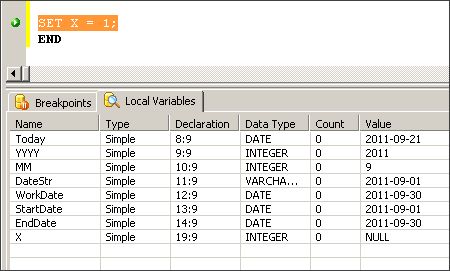
    Breakpoints are very cool. They let you see the current value of all the local variable that have been declared within the script at the very spot of the breakpoint. I set the breakpoint at the line
    SET X = 1;
    which is a do nothing statement purely for the purpose of letting me view the local variables.


    I'm metioning these items because that is how I tested and viewed the results of the date math code I'm about to share with you.

    How many times have you had to use a Start Date and End Date within your SQL queries? How many times have you had to set the Start Date equal to the first day of the current month and the End Date to the last day of the current month? How about the first and last days of the previous month, or the following month.

    I'm about to show you a simple, sure fire way to set these dates so they work everytime, no matter what. You don't need to worry about going backwards or forwards a year. You don't need to worry whether there are 30 or 31 days in a month. You don't need to worry about February having 28 or 29 days. It's that simple.

    Just copy and past this code into an ElevateDB Script. Set a breakpoint at the line mentioned above and your all set. There's only one line that needs to be inserted into the bottom two examples that makes them different from the first example. I've colored them red.

    How to set the StartDate and EndDate for the Current Month


    SCRIPT
    BEGIN
    ----------------------------------------------------------------
    -- This snippet of code sets the StartDate and EndDate to the 
    -- first day  and last day of the current month
    ----------------------------------------------------------------
    DECLARE Today     DATE;
    DECLARE YYYY      INTEGER;
    DECLARE MM        INTEGER;
    DECLARE DateStr   VARCHAR(10);
    DECLARE WorkDate  DATE;
    DECLARE StartDate DATE;
    DECLARE EndDate   DATE;
    
    ----------------------------------------------------------------
    -- X is used set a breakpoint within ED Manager
    ----------------------------------------------------------------
    DECLARE X INTEGER;
    
    ----------------------------------------------------------------
    -- Get the current Year and Month
    ----------------------------------------------------------------
    SET Today = Current_Date;
    SET YYYY  = EXTRACT(YEAR FROM Today);
    SET MM    = EXTRACT(Month FROM Today);
    
    ----------------------------------------------------------------
    -- Set the WorkDate equal to the first day of the current month
    -- by building a date string from the extracted date parts
    -- Example: YYYY-MM-01
    -- WHERE YYYY is the extracted Year
    -- AND   MM   is the extracted Month
    -- Make sure to pad any month less than 10 with a leading zero
    ----------------------------------------------------------------
    SET DateStr = '';
    SET DateStr = DateStr + CAST(YYYY as VARCHAR);
    SET DateStr = DateStr + '-';
    IF MM < 10 THEN
      SET DateStr = DateStr + '0';
    END IF;
    SET DateStr = DateStr + CAST(MM as VARCHAR);
    SET DateStr = DateStr + '-01';
    SET WorkDate  = CAST(DateStr as DATE);
    
    ----------------------------------------------------------------
    -- Set StartDate equal to the first day of the month and create
    -- the EndDate by performing two simple date math operations
    -- 1. Add one Month to the WorkDate
    -- 2. Subtract one Day from the WorkDate
    ----------------------------------------------------------------
    SET StartDate = WorkDate;
    SET WorkDate  = WorkDate + Interval  '1' MONTH;
    SET WorkDate  = WorkDate + Interval '-1' DAY;
    SET EndDate   = WorkDate;
    
    SET X = 1;
    END
    

    How to set the StartDate and EndDate for the Previous Month


    SCRIPT
    BEGIN
    ----------------------------------------------------------------
    -- This snippet of code sets the StartDate and EndDate to the 
    -- first day  and last day of the previous month
    ----------------------------------------------------------------
    DECLARE Today     DATE;
    DECLARE YYYY      INTEGER;
    DECLARE MM        INTEGER;
    DECLARE DateStr   VARCHAR(10);
    DECLARE WorkDate  DATE;
    DECLARE StartDate DATE;
    DECLARE EndDate   DATE;
    
    ----------------------------------------------------------------
    -- X is used set a breakpoint within ED Manager
    ----------------------------------------------------------------
    DECLARE X INTEGER;
    
    ----------------------------------------------------------------
    -- Get the current Year and Month
    ----------------------------------------------------------------
    SET Today = Current_Date;
    SET YYYY  = EXTRACT(YEAR FROM Today);
    SET MM    = EXTRACT(Month FROM Today);
    
    ----------------------------------------------------------------
    -- Set the WorkDate equal to the first day of the current month
    -- by building a date string from the extracted date parts
    -- Example: YYYY-MM-01
    -- WHERE YYYY is the extracted Year
    -- AND   MM   is the extracted Month
    -- Make sure to pad any month less than 10 with a leading zero
    ----------------------------------------------------------------
    SET DateStr = '';
    SET DateStr = DateStr + CAST(YYYY as VARCHAR);
    SET DateStr = DateStr + '-';
    IF MM < 10 THEN
      SET DateStr = DateStr + '0';
    END IF;
    SET DateStr = DateStr + CAST(MM as VARCHAR);
    SET DateStr = DateStr + '-01';
    SET WorkDate  = CAST(DateStr as DATE);
    
    ----------------------------------------------------------------
    -- For Previous month subtract one month from WorkDate
    -- Set StartDate equal to the first day of the month and create
    -- the EndDate by performing two simple date math operations
    -- 1. Add one Month to the WorkDate
    -- 2. Subtract one Day from the WorkDate
    ----------------------------------------------------------------
    SET WorkDate  = WorkDate + Interval '-1' Month;
    SET StartDate = WorkDate;
    SET WorkDate  = WorkDate + Interval  '1' MONTH;
    SET WorkDate  = WorkDate + Interval '-1' DAY;
    SET EndDate   = WorkDate;
    
    SET X = 1;
    END
    

    How to set the StartDate and EndDate for the Following Month


    SCRIPT
    BEGIN
    ----------------------------------------------------------------
    -- This snippet of code sets the StartDate and EndDate to the 
    -- first day  and last day of the following month
    ----------------------------------------------------------------
    DECLARE Today     DATE;
    DECLARE YYYY      INTEGER;
    DECLARE MM        INTEGER;
    DECLARE DateStr   VARCHAR(10);
    DECLARE WorkDate  DATE;
    DECLARE StartDate DATE;
    DECLARE EndDate   DATE;
    
    ----------------------------------------------------------------
    -- X is used set a breakpoint within ED Manager
    ----------------------------------------------------------------
    DECLARE X INTEGER;
    
    ----------------------------------------------------------------
    -- Get the current Year and Month
    ----------------------------------------------------------------
    SET Today = Current_Date;
    SET YYYY  = EXTRACT(YEAR FROM Today);
    SET MM    = EXTRACT(Month FROM Today);
    
    ----------------------------------------------------------------
    -- Set the WorkDate equal to the first day of the current month
    -- by building a date string from the extracted date parts
    -- Example: YYYY-MM-01
    -- WHERE YYYY is the extracted Year
    -- AND   MM   is the extracted Month
    -- Make sure to pad any month less than 10 with a leading zero
    ----------------------------------------------------------------
    SET DateStr = '';
    SET DateStr = DateStr + CAST(YYYY as VARCHAR);
    SET DateStr = DateStr + '-';
    IF MM < 10 THEN
      SET DateStr = DateStr + '0';
    END IF;
    SET DateStr = DateStr + CAST(MM as VARCHAR);
    SET DateStr = DateStr + '-01';
    SET WorkDate  = CAST(DateStr as DATE);
    
    ----------------------------------------------------------------
    -- For Following month add one month to WorkDate
    -- Set StartDate equal to the first day of the month and create
    -- the EndDate by performing two simple date math operations
    -- 1. Add one Month to the WorkDate
    -- 2. Subtract one Day from the WorkDate
    ----------------------------------------------------------------
    SET WorkDate  = WorkDate + Interval '1' Month;
    SET StartDate = WorkDate;
    SET WorkDate  = WorkDate + Interval  '1' MONTH;
    SET WorkDate  = WorkDate + Interval '-1' DAY;
    SET EndDate   = WorkDate;
    
    SET X = 1;
    END


    Enjoy,
    Gunny Mike

    Tuesday, September 13, 2011

    ElevateDB: Stored Procedures Part 5

    In the last post of this series ElevateDB: Stored Procedures Part 4 I told you I would share with you the optimized version of the stored procedure written by Tim Young from ElevateSoft and I will. However, I need to point out that the monthly payment was calculated differently between the Microsoft SQL code and the ElevateDB code.

    I made sure I declared the APR input parameter as decimal(19,4) in both Microsft SQL and ElevateDB. Here are those declarations along with the appropriate code snippets:
    -----------------------------------------------------------------
    -- Microsoft SQL
    -----------------------------------------------------------------
    @APR decimal(19,4) = 3.25
    DECLARE @Payment decimal(19,2)
    SET @Payment = ROUND(@Principal * ((@APR/1200)/(1- EXP((@Months*-1) * LOG(1 + (@APR/1200))))),2)
    
    Payment = 1370.20 (this is correct)
    
    -----------------------------------------------------------------
    -- ElevateDB (APR = 3.25 although it's not shown)
    -----------------------------------------------------------------
    IN "APR" DECIMAL(19,4), 
    DECLARE Payment decimal(19,2);
    SET Payment = ROUND(Principal * ((APR/1200)/(1- EXP((Months*-1) * LN(1 + (APR/1200))))) to 2);
    
    Payment = 1369.26 (this is incorrect)
    
    So, I decided to investigate why the two payments were different. Upon close examination I found the following:

    Even though both database have APR defined as decimal(19,4)...

    Microsoft SQL calculates @APR/1200 as 0.002708333
    ElevateDB calculates APR/1200 as 0.0027

    I won't speculate why Microsoft's calculations seem to ignore the decimal place rules. I do know that ElevateDB does enforce the decimal place rules. So, armed with this bit of information, I changed ElevateDB to use the Float datatype for APR,

    -----------------------------------------------------------------
    -- ElevateDB Revisited (APR = 3.25 although it's not shown)
    -----------------------------------------------------------------
    IN "APR" float,
    DECLARE Payment decimal(19,2);
    SET Payment = ROUND(Principal * ((APR/1200)/(1- EXP((Months*-1) * LN(1 + (APR/1200))))) to 2);
    
    Payment = 1370.20 (this is now correct)

    So, if you intend to do calculations where the decimal places need to go beyond 4 places when using ElevateDB make sure to use the float datatype.

    As promised, here is the optimized amortization schedule that Tim Young produced from the example Microsoft SQL Code i posted to his forum. There's a lot you can learn about how ElevateDB works from this code snippet, Enjoy!
    ----------------------------------------------------------------
    -- SQL Amortization Schedule
    -- Copyright 2011 © By Michael J. Riley
    -- www.zilchworks.com
    -- Created by Tim Young - ElevateSoft
    -- www.elevatesoft.com
    ----------------------------------------------------------------
    CREATE PROCEDURE "spAmortizationSchedule02" (
    INOUT "StartDate" DATE, 
    INOUT "Principal" DECIMAL(19,4), 
    INOUT "APR" FLOAT, 
    INOUT "Months" INTEGER)
    BEGIN
    
    ----------------------------------------------------------------
    -- VARIABLE DECLARATIONS USED FOR PROCESSING
    ----------------------------------------------------------------
    
    DECLARE InsertStmt STATEMENT;
    DECLARE InfoCursor SENSITIVE CURSOR FOR InfoStmt;
    DECLARE ResultCursor SENSITIVE CURSOR WITH RETURN FOR ResultStmt;
    
    DECLARE Payment      DECIMAL(19,4);
    DECLARE PaymentLast  DECIMAL(19,4);
    DECLARE PmtNumber    INTEGER;
    DECLARE PmtDate      DATE;
    DECLARE BalanceStart DECIMAL(19,4);
    DECLARE PmtInterest  DECIMAL(19,4);
    DECLARE PmtPrincipal DECIMAL(19,4);
    DECLARE BalanceEnd   DECIMAL(19,4);
    
    ----------------------------------------------------------------
    -- INPUT PARAMETERS WITH DEFAULT VALUES
    ----------------------------------------------------------------
    
    SET StartDate = COALESCE(StartDate, CURRENT_DATE());
    SET Principal = COALESCE(Principal, 195000);
    SET APR = COALESCE(APR, 3.25);
    SET Months = COALESCE(Months, 180);
    
    ----------------------------------------------------------------
    -- TEMP TABLE TO HOLD AMORTIZATION OUTPUT
    ----------------------------------------------------------------
    
    PREPARE InfoStmt FROM 'SELECT * FROM Information.TemporaryTables WHERE Name=?';
    OPEN InfoCursor USING 'TempAmortization02';
    IF ROWCOUNT(InfoCursor) > 0 THEN
      EXECUTE IMMEDIATE 'EMPTY TABLE TempAmortization02';
    ELSE
      EXECUTE IMMEDIATE 'CREATE TEMPORARY TABLE TempAmortization02
                        (
                        PmtNumber    INTEGER       ,
                        PmtDate      DATE          ,
                        PmtAmount    DECIMAL(19,4) ,
                        BalanceStart DECIMAL(19,4) ,
                        PmtPrincipal DECIMAL(19,4) ,
                        PmtInterest  DECIMAL(19,4) ,
                        BalanceEnd   DECIMAL(19,4)
                        )';
    END IF;
    
    ----------------------------------------------------------------
    -- CALCULATE MONTHLY PAYMENT BASED ON INPUT PARAMETERS
    -- This line may wrap and be hard to read
    ----------------------------------------------------------------
    SET Payment = ROUND(Principal * ((APR/1200)/(1- EXP((Months*-1) *
                 LOG(1 + (APR/1200))))) to 2);
    
    ----------------------------------------------------------------
    -- INITALIZE VARIABLES BEFORE THE LOOP STARTS
    ----------------------------------------------------------------
    SET PmtNumber  = 0;
    SET BalanceEnd = Principal;
    
    PREPARE InsertStmt FROM 'INSERT INTO TempAmortization02
                           (
                           PmtNumber     ,
                           PmtDate       ,
                           PmtAmount     ,
                           BalanceStart  ,
                           PmtPrincipal  ,
                           PmtInterest   ,
                           BalanceEnd
                           )
                           VALUES (?,?,?,?,?,?,?)';
    
    ----------------------------------------------------------------
    -- PERFORM CALCULATIONS FOR ALL BUT LAST MONTH AND
    -- STORE RESULTS IN TEMPORARY TABLE
    -- 
    -- MICROSOFT SQL DATEADD(,,
    -- ELEVATEDB SQL  + INTERVAL '' 
    ----------------------------------------------------------------
    WHILE PmtNumber < Months -1 DO
    
    SET PmtNumber    = PmtNumber + 1;
    SET BalanceStart = BalanceEnd;
    SET PmtDate      = (StartDate + CAST(PmtNumber-1 AS INTERVAL MONTH));
    SET PmtInterest  = ROUND(BalanceStart *(APR/1200) to 2);
    SET PmtPrincipal = Payment - PmtInterest;
    SET BalanceEnd   = BalanceStart - PmtPrincipal;
    
    EXECUTE InsertStmt USING PmtNumber     ,
                             PmtDate       ,
                             Payment       ,
                             BalanceStart  ,
                             PmtPrincipal  ,
                             PmtInterest   ,
                             BalanceEnd;
    
    END WHILE;
    
    ----------------------------------------------------------------
    -- PERFORM CALCULATIONS FOR THE LAST MONTH AND
    -- STORE RESULTS IN TEMPORARY TABLE
    ----------------------------------------------------------------
    SET PmtNumber    = PmtNumber +1;
    SET BalanceStart = BalanceEnd;
    SET PmtDate      = (StartDate + CAST(PmtNumber-1 AS INTERVAL MONTH));
    SET PmtInterest  = ROUND(BalanceStart *(APR/1200) ,2);
    SET PaymentLast  = BalanceStart + PmtInterest;
    SET PmtPrincipal = BalanceStart;
    SET BalanceEnd   = BalanceStart + PmtInterest - PaymentLast;
    
    EXECUTE InsertStmt USING PmtNumber     ,
                            PmtDate       ,
                            PaymentLast   ,
                            BalanceStart  ,
                            PmtPrincipal  ,
                            PmtInterest   ,
                            BalanceEnd;
    
    ----------------------------------------------------------------
    -- RETURN RESULTS FROM TEMPORARY TABLE
    ----------------------------------------------------------------
    
    PREPARE ResultStmt FROM 'SELECT
                           PmtNumber     ,
                           PmtDate       ,
                           PmtAmount     ,
                           BalanceStart  ,
                           PmtPrincipal  ,
                           PmtInterest   ,
                           BalanceEnd
                           FROM TempAmortization02';
    OPEN ResultCursor;
    
    END
    
    VERSION 1.00!
    ----------------------------------------------------------------
    
    Semper Fi,
    Gunny Mike

    < Prev

    Thursday, September 8, 2011

    ElevateDB: Stored Procedures Part 4

    Last time in ElevateDB: Stored Procedures Part 3 I showed you how I went about creating an Amortization schedule that works with Microsoft SQL Server. This took me all of about 35 minutes.

    You may be wondering why I'm writing about SQL code in a Delphi blog and also why I'm writing about Microsoft SQL if this blog series is entitle "ElevateDB: Stored Procedures Part XX".

    Well, the answer is simple... I upgraded from Delphi 5 Enterprise to Delphi 2010 Professional. That in itself is a big jump. Furthermore, I want to create a Delphi database applications that uses an embedded database, and in this case I have chosen to use ElevateDB.

    So, my goal is to create a very simple Delphi program that prints out an Amortization Schedule using Rave Reports that pulls the data from a database.

    Because I'm blogging about how I am going about doing this, sort of creating a Programming Documentary or "Progumentary", wow I just made up a new word. See how this works.

    Do I know how to use Rave Reports that comes with Delphi 2010? No, not yet. But I know if the data is in a database table I can more easily create that Rave Report.

    Have I created the Delphi 2010 VCL form for gathering the data inputs needed? No, but I know I can do this and that part is coming later.

    Do I know how to get the data into an ElevateDB database using a stored procedure? No. But I do know how to get the data into a MS SQL Database using a stored procedure and that is where this Pro-gu-mentary is right now.

    ElevateDB comes with an ElevateDB Manager, which is a tool similar to Microsoft SQL Server Management Studio. It allows you to create databases, database objects and gives you a very robust query analyzer for performing all the necessary databse tasks.

    I have decided to put all the code logic for creating this amortization schedule inside a stored procedure. This allows me to develop a stand alone module that I can test and measure outside of Delphi. I asked a question on SO about using a proc verus keeping the code in Delphi and received a few interesting responses. (Link to SO Question)

    Because I know I can wire up a few simple controls on a Delphi VCL form and make "One" call to an ElevateDB stored procedure this is time well spent and code that will be used when the time comes.

    So, after 6 plus hours of trying to get a similar stored procedure working in ElevateDB here is what I came up with:

    ----------------------------------------------------------------
    -- SQL Amortization Schedule
    -- Copyright 2011 © By Michael J. Riley
    -- www.zilchworks.com
    ----------------------------------------------------------------
    CREATE PROCEDURE "spAmortizationSchedule" 
    (
    IN "StartDate" DATE, 
    IN "Principal" DECIMAL(19,2), 
    IN "APR" DECIMAL(19,4), 
    IN "Months" INTEGER
    )
    
    BEGIN
    ----------------------------------------------------------------
    -- VARIABLE DECLARATIONS USED FOR PROCESSING
    ----------------------------------------------------------------
    DECLARE Payment      decimal(19,2);
    DECLARE PaymentLast  decimal(19,2);
    DECLARE PmtNumber    int          ;
    DECLARE PmtDate      date         ;
    DECLARE BalanceStart decimal(19,2);
    DECLARE PmtInterest  decimal(19,2);
    DECLARE PmtPrincipal decimal(19,2);
    DECLARE BalanceEnd   decimal(19,2);
    
    DECLARE SQLStatement Statement;
    DECLARE Result CURSOR WITH RETURN FOR Stmt;
    
    /*
    ----------------------------------------------------------------
    -- TEST FOR NULL INPUTS ADD AT SOME POINT
    -- PSEUDO-CODE UNTIL I FIGURE OUT HOW TO DO THIS IN ELEVATDB
    ----------------------------------------------------------------
    IF StartDate IS NULL THEN SET STARTDATE = Current_Date;
    IF Principal IS NULL THEN SET Principal = 190000;
    IF APR       IS NULL THEN SET APR       = 3.25;
    IF Months    IS NULL THEN SET Months    = 180;
    */
    
    ----------------------------------------------------------------
    -- EMPTY TABLE FOR NEW USE
    ----------------------------------------------------------------
    EXECUTE IMMEDIATE 'EMPTY TABLE "TempAmortization"';
    
    ----------------------------------------------------------------
    -- CALCULATE MONTHLY PAYMENT BASED ON INPUT PARAMETERS
    -- THIS LINE IS LONG AND MAY WRAP MAKING IT HARD TO READ
    ----------------------------------------------------------------
    SET Payment = ROUND(Principal * ((APR/1200)/(1- EXP((Months*-1) * LN(1 + (APR/1200))))) to 2);
    
    ----------------------------------------------------------------
    -- INITALIZE VARIABLES BEFORE THE LOOP STARTS
    ----------------------------------------------------------------
    SET PmtNumber  = 0         ;
    SET BalanceEnd = Principal ;
    SET PmtDate = StartDate + INTERVAL '-1' MONTH;
    
    ----------------------------------------------------------------
    -- PERFORM CALCULATIONS FOR ALL BUT LAST MONTH
    -- PmtDate column commented out. Need to get the proper syntax.
    ----------------------------------------------------------------
    WHILE PmtNumber < Months -1
    DO
      
      SET PmtNumber    = PmtNumber +1;
      SET BalanceStart = BalanceEnd;
      SET PmtDate      = PmtDate + INTERVAL '1' MONTH;
      SET PmtInterest  = ROUND(BalanceStart * (APR/1200) to 2);
      SET PmtPrincipal = Payment -  PmtInterest;
      SET BalanceEnd   = BalanceStart -  PmtPrincipal;
    
      EXECUTE IMMEDIATE '
      INSERT INTO TempAmortization
      (
      PmtNumber     ,
    --  PmtDate       ,
      PmtAmount     ,
      BalanceStart  ,
      PmtPrincipal  ,
      PmtInterest   ,
      BalanceEnd    
      )
      VALUES
      (
      '   + CAST(PmtNumber    as varchar(25)) + '   ,
    --  ''' + CAST(PmtDate      as varchar(25)) + ''' ,
      '   + CAST(Payment      as varchar(25)) + '   ,
      '   + CAST(BalanceStart as varchar(25)) + '   ,
      '   + CAST(PmtPrincipal as varchar(25)) + '   ,
      '   + CAST(PmtInterest  as varchar(25)) + '   ,
      '   + CAST(BalanceEnd   as varchar(25)) + '
      )
      ';
    
    END WHILE;
    
    ----------------------------------------------------------------
    -- PERFORM CALCULATIONS FOR THE LAST MONTH AND
    -- PmtDate column commented out. Need to get the proper syntax.
    ----------------------------------------------------------------
    SET PmtNumber    = PmtNumber +1;
    SET BalanceStart = BalanceEnd;
    SET PmtDate      = PmtDate + INTERVAL '1' MONTH;
    SET PmtInterest  = ROUND(BalanceStart * (APR/1200) to 2);
    SET PaymentLast  = BalanceStart + PmtInterest;
    SET PmtPrincipal = BalanceStart;
    SET BalanceEnd   = BalanceStart + PmtInterest - PaymentLast;
    
    EXECUTE IMMEDIATE '
    INSERT INTO TempAmortization
    (
    PmtNumber     ,
    --PmtDate       ,
    PmtAmount     ,
    BalanceStart  ,
    PmtPrincipal  ,
    PmtInterest   ,
    BalanceEnd
    )
    VALUES
    (
    ' + CAST(PmtNumber    as varchar(25)) + ' ,
    --''' + CAST(PmtDate      as varchar(25)) + ''' ,
    ' + CAST(PaymentLast  as varchar(25)) + ' ,
    ' + CAST(BalanceStart as varchar(25)) + ' ,
    ' + CAST(PmtPrincipal as varchar(25)) + ' ,
    ' + CAST(PmtInterest  as varchar(25)) + ' ,
    ' + CAST(BalanceEnd   as varchar(25)) + '
    )
    ';
    
    ----------------------------------------------------------------
    -- RETURN RESULTS FROM TEMPORARY TABLE
    ----------------------------------------------------------------
    PREPARE Stmt FROM 
    '
    SELECT  
    PmtNumber     , 
    PmtDate       , 
    PmtAmount     , 
    BalanceStart  ,
    PmtPrincipal  ,
    PmtInterest   ,
    BalanceEnd    
    FROM TempAmortization
    ';
    
    OPEN Result;
    
    END
    VERSION 1.00!
    ----------------------------------------------------------------
    It's crude, it works, except for the PmtDate column but at least I knew enough to comment out just that one portion. There are some things I had to do differently from the original MS SSQL Stored Proc:
    • Had to skip error trapping the input parameters becaue I don't know how to set default values
    • Had to used to use a real table instead of a temp table because I kept getting errors saying the temp table already exists for this session, bla bla bla
    • Had to comment out the Payment Date column because I could not figure out the proper syntax even thought I thought I had worked that out with the ElevateDB Date Math stuff. I'll have to revisit ElevateDB Date Math at a later time
    A day or two later Tim Young, the guy who created ElevateDB posted this on the support forum...


    Michael,

    << I'm new to ElevateDB coming from a Microsoft SQL background. Roy suggested I whip up an example of a Microsoft Stored procedure that I'd like to get converted over to ElevateDB and post it to the forum. >>

    I know that you've already got this done, but here's an optimal version for EDB:

    CODE GOES HERE
    (I'll share his code in a future post)


    How cool is that. I got the guy who created ElevateDB to whip up an optimized version of the stored proc I needed. The proc I wrote in MS SQL is filled with little nuggets that can be used over and over again in other stored procs. There's alot going on in there. For example:
    • Use of defaults for input paramters
    • Use of temp table for storing temporary data
    • A date math routine that increments a date by one month
    • Use of a While loop
    • Selection of the final result set
    That's it for now. Gunny Out!

    Semper Fi,
    Gunny Mike

    < Prev

    Next >

    Tuesday, September 6, 2011

    ElevateDB: Stored Procedures Part 3

    In my last ElevateDB Stored Procedure post I went on a rant about how frustrating my stored procedure journey became. Well, today is a new day and I feel better. A few more posts were added to the support thread I started with one really good one by the Tim Young the creator of ElevateDB.

    The stored proc I was attempting to create is a fairly simple "Amortization Schedule". So here is how you go about building an Amortization Schedule from scratch.

    Because I'm an old school programmer here's my very simple method of deciding how to do just about every programming task:

    Gunny's Rules
    • 1. Identify the output
    • 2. Identify the inputs
    • 3. Ask ====> Are there enough inputs to create that output?
    If the answer is NO there are not enough inputs to create that output, then go get the necessary inputs. It's a waste of time to begin writing code until you have all the inputs. If you spend a little time now ironing out these details you will save tons of time later.

    This is really bone simple but it works. Or as I used to say to my Major... "It's Gump Proof" (Yeah I know I'm a Marine but it's still a cool saying. Calling something Gomer Proof doesn't have the same meaning.)

    Identify The Output:
    A database table that contains payment information for each monthly payment in an Amortization Schedule. To be more specific:
    • Payment Number
    • Payment Date
    • Balance Before Payment
    • Payment Amount
    • Principal Portion of Payment
    • Interest Portion or Payment
    • Balance After Payment
    Identify The Inputs:
    • Payment Start Date
    • Loan Amount
    • Annual Percentage Rate (APR)
    • Length of Loan in Months
    Ask ====> Are there enough inputs to create that output?

    Answer: No. I need the payment amount.

    Decision Time: Okay, there are two choices at this point.
    • Ask for this value to be supplied just like the other values
    • Calculate the payment based on the existing input values
    I decide to calculate the payment. So now I need a loan payment formula. Let's assume I know where to get one of these. The major point is I identified an additional input was needed - A Formula. My list of inputs now looks like this:

    Identify The Inputs:
    • Payment Start Date
    • Loan Amount
    • Annual Percentage Rate (APR)
    • Length of Loan in Months
    • Loan Payment Formula
    Ask ====> Are there enough inputs to create that output?

    Answer: No. I need two more bits of information.
    • Another formula for calculating the Interest Portion of the payment
    • A method for advancing the Payment Date by one month
    No problem. That formula is pretty straigh forward and most SQL languages support Date Math. I'm good at this point. Let's have another look at the list of inputs.

    Identify The Inputs:
    • Payment Start Date
    • Loan Amount
    • Annual Percentage Rate (APR)
    • Length of Loan in Months
    • Loan Payment Formula
    • Interest Payment Formula
    • Date Math Routine
    Ask ====> Are there enough inputs to create that output?

    Answer: Yes

    That is Gunny's simple Gump Proof way of gathering requirements. Here is a Microsoft SQL Server version of the stored procedure. Next time I will show you my working but lame attempt at creating the same amortization stored procedure using ElevateDB. Enjoy!


    ----------------------------------------------------------------
    -- SQL Amortization Schedule
    -- Copyright 2011 © By Michael J. Riley
    -- www.zilchworks.com
    ----------------------------------------------------------------
    CREATE PROCEDURE [dbo].[spAmortizationSchedule] 
    
    ----------------------------------------------------------------
    -- INPUT PARAMETERS WITH DEFAULT VALUES
    ----------------------------------------------------------------
    @StartDate  datetime      = '2011-09-15' ,
    @Principal  decimal(19,2) = 195000       ,
    @APR        decimal(19,4) = 3.25         ,
    @Months     integer       = 180
    
    AS
    
    ----------------------------------------------------------------
    -- VARIABLE DECLARATIONS USED FOR PROCESSING
    ----------------------------------------------------------------
    DECLARE @Payment      decimal(19,2)
    DECLARE @PaymentLast  decimal(19,2)
    DECLARE @PmtNumber    int
    DECLARE @PmtDate      date
    DECLARE @BalanceStart decimal(19,2)
    DECLARE @PmtInterest  decimal(19,2)
    DECLARE @PmtPrincipal decimal(19,2)
    DECLARE @BalanceEnd   decimal(19,2)
    
    ----------------------------------------------------------------
    -- TEMP TABLE TO HOLD AMORTIZATION OUTPUT
    ----------------------------------------------------------------
    CREATE TABLE #TempAmortization
    (
    PmtNumber    int           , 
    PmtDate      date          , 
    PmtAmount    decimal(19,2) , 
    BalanceStart decimal(19,2) ,
    PmtPrincipal decimal(19,2) ,
    PmtInterest  decimal(19,2) ,
    BalanceEnd   decimal(19,2) 
    )
    
    ----------------------------------------------------------------
    -- CALCULATE MONTHLY PAYMENT BASED ON INPUT PARAMETERS
    -- This line may wrap and be hard to read
    ----------------------------------------------------------------
    SET @Payment = ROUND(@Principal * ((@APR/1200)/(1- EXP((@Months*-1) *
    LOG(1 + (@APR/1200))))),2)
    
    ----------------------------------------------------------------
    -- INITALIZE VARIABLES BEFORE THE LOOP STARTS
    ----------------------------------------------------------------
    SET @PmtNumber  = 0
    SET @BalanceEnd = @Principal
    
    ----------------------------------------------------------------
    -- PERFORM CALCULATIONS FOR ALL BUT LAST MONTH AND
    -- STORE RESULTS IN TEMPORARY TABLE
    ----------------------------------------------------------------
    WHILE @PmtNumber < @Months -1
    BEGIN
     
     SET @PmtNumber    = @PmtNumber +1
     SET @BalanceStart = @BalanceEnd
     SET @PmtDate      = DATEADD(m, @PmtNumber-1, @StartDate)
     SET @PmtInterest  = ROUND(@BalanceStart *(@APR/1200) ,2)
     SET @PmtPrincipal = @Payment - @PmtInterest
     SET @BalanceEnd   = @BalanceStart - @PmtPrincipal
    
     INSERT INTO #TempAmortization
     (
     PmtNumber     , 
     PmtDate       , 
     PmtAmount     , 
     BalanceStart  ,
     PmtPrincipal  ,
     PmtInterest   ,
     BalanceEnd    
     )
     VALUES
     (
     @PmtNumber     , 
     @PmtDate       ,  
     @Payment       ,
     @BalanceStart  ,
     @PmtPrincipal  ,
     @PmtInterest   ,
     @BalanceEnd    
     )
     
    END
    
    ----------------------------------------------------------------
    -- PERFORM CALCULATIONS FOR THE LAST MONTH AND
    -- STORE RESULTS IN TEMPORARY TABLE
    ----------------------------------------------------------------
    SET @PmtNumber    = @PmtNumber +1
    SET @BalanceStart = @BalanceEnd
    SET @PmtDate      = DATEADD(m, @PmtNumber-1, @StartDate )
    SET @PmtInterest  = ROUND(@BalanceStart *(@APR/1200) ,2)
    SET @PaymentLast  = @BalanceStart + @PmtInterest
    SET @PmtPrincipal = @BalanceStart
    SET @BalanceEnd   = @BalanceStart + @PmtInterest - @PaymentLast
    
    INSERT INTO #TempAmortization
    (
    PmtNumber     , 
    PmtDate       , 
    PmtAmount     , 
    BalanceStart  ,
    PmtPrincipal  ,
    PmtInterest   ,
    BalanceEnd    
    )
    VALUES
    (
    @PmtNumber     , 
    @PmtDate       ,  
    @PaymentLast   ,
    @BalanceStart  ,
    @PmtPrincipal  ,
    @PmtInterest   ,
    @BalanceEnd    
    )
    
    ----------------------------------------------------------------
    -- RETURN RESULTS FROM TEMPORARY TABLE
    ----------------------------------------------------------------
    SELECT  
    PmtNumber     , 
    PmtDate       , 
    PmtAmount     , 
    BalanceStart  ,
    PmtPrincipal  ,
    PmtInterest   ,
    BalanceEnd    
    FROM #TempAmortization
    
    ----------------------------------------------------------------
    -- HOUSEKEEPING
    ----------------------------------------------------------------
    DROP TABLE #TempAmortization
    
    Semper Fi, Gunny Mike

    < Prev

    Next >