Saturday, February 7, 2015

Delphi Speed Tip: Create Local Variables Inline On The Fly

Here is another one of my Love Delphi / Hate Delphi nit pics. I love the strong typing aspect of Delphi. I believe you should always define a variable before you use it. I hate it though when you are inside the guts of a procedure or function and you need a new variable. You have to jump up above the begin statement define the variable and then go back to the spot you were just at and continue coding.

Well I just discovered you can create a new local variable inline on the fly and begin usinging it immediately.

I'd like to thank Ron Grove for demonstrating this handy tip in his video.


Enjoy - Semper Fi,
Gunny Mike
end.

Friday, January 16, 2015

Make Your Software Installs More Professional

I was showing a friend of mine one of the latest programs I just created. He downloaded it and it installed perfectly. I asked him to uninstall it after we got done looking at it. He went straight to the Control Panel - Programs and Features and to my surprise my application was not listed.

I use Inno Setup (highly recommended) for all of my install files. It turns out that you need to include two directives inside the [Setup] section of the Inno Setup script in order for your program to be listed. I'd like to thank TLama from StackOverflow for his answer.

[Setup]
UninstallDisplayName={#MyAppName}
UninstallDisplayIcon={app}\{#MyAppExeName}

Adding unistall information with Inno Setup
TLama
Inno Setup

Enjoy!

Semper Fi
Gunny Mike
end.

Saturday, January 3, 2015

Most Frequently Used Shortcuts By Delphi Programmers

Here is a list of the most frequently used shortcuts by Delphi programmers

Ctrl+.
IDE Insight - Focus the IDE Insight input box

Ctrl+Space
Code Completion (window resizeable/sortable)
Video

Ctrl+Shift+Space
Code Parameter Hints (invoke tooltip help)
Video

Ctrl+Shift+A
Find Unit - Add to Implementation or Interface

Ctrl+Shift+C
Class Code Completion at Cursor

Ctrl+Shift+V
Declare Vaiable

Ctrl+Shift+D
Declare Field

Ctrl+J
Code Templates (window resizeable)
Video

Ctrl+Shift+J
Sync Edit
Video

Ctrl+Left Click
Alt+Up Arrow
Code Browsing (requires $YD)

Ctrl+Shift+Up Arrow
Ctrl+Shift+Dn Arrow
Code Jumping Between Declaration/Implementation

Alt+Left Click+Drag
Select Block

Tab
Indent Selected Code
Indent Selected Block

Shift+Tab
Outdent Selected Code
Outdent Selected Block

Ctrl+D
Format Selected Code
Format Selected Block

F9
Run

Ctrl+Shift+F9
Run Without Debugging

F4
Run To Cursor (Build Debug)

Ctrl+F9
Compile

F5
Set/Remove Breakpoint
Video

F7
Trace Into

F8
Step Over

Ctrl+F2
Program Reset

Code Folding Shortcuts


Ctrl+Shift+K+A
Expand All Blocks of code

Ctrl+Shift+K+C
Collapse All Classes 

Ctrl+Shift+K+M
Collapse All Methods 

Case Statement Code Completion
https://stackoverflow.com/a/13532718/195983

Complete List of Shortcuts

Enjoy,
Gunny Mike
end.

Sunday, December 28, 2014

How to Display Menu Item Hints in Delphi Applications (Revisited)

Last week I decided I wanted the main menu hints and popup menu hints to display in a tooltip window just like the hints for all the other controls. I figured it shouldn't be that difficult, right. Microsoft does it all over the place so why shouldn't my applications.

Wow did I under estimate what it takes to pull this one off.

It turns out that menuitem hints by design are intended to display in the status bar. Who's bright idea was that? I don't know about you but when I mouseover stuff my eyes look where the mouse cursor is. I hardly ever look down at the status bar.

So, I turned to google and began my search for code. I figured that someone has already done this and I can just implement their solution. Almost but not quite.

Here are my requirements:
  1. Display all main menu hints in a tooltip
  2. Display all popup menu hints in a tooltip
  3. Display multi-line menu hints as multi-lines
I'd like to thank Zarko Gajic and mghie (from stackoverflow) for doing all the hard work and providing the code base that I tweaked in my final implementation.

How to Display Menu Item Hints in Delphi Applications - Zarko Gajic
Display a ToolTip hint on a disabled menu item of a popup menu - mghie

I have heavily commented the code below for a very specific reason. I wanted it to standout from all the other code in my application. Here is what the folded code looks like in my IDE

Yes those are real box drawing characters. I like the way the structured comments keeps all the code needed for the menuhints implementation in a nice, visual group.

Semper Fi,
Gunny Mike

Add to Uses
  Vcl.Menus
  Vcl.ExtCtrls

Interface Section
{┌────────────────────────────────────────────────────────────┐}
{│ MenuHints Type Declaration                                 │}
{├────────────────────────────────────────────────────────────┤}
{│ How to Display Menu Item Hints in Delphi Applications      │}
{│ http://delphi.about.com/od/vclusing/a/menuitemhints.htm    │}
{│ Zarko Gajic                                                │}
{├────────────────────────────────────────────────────────────┘}
{│} type
{│}   TMenuItemHint = class(THintWindow)
{│}     private
{│}       activeMenuItem : TMenuItem;
{│}       showTimer : TTimer;
{│}       hideTimer : TTimer;
{│}       procedure HideTime(Sender : TObject) ;
{│}       procedure ShowTime(Sender : TObject) ;
{│}     public
{│}       constructor Create(AOwner : TComponent) ; override;
{│}       destructor Destroy; override;
{│}       procedure DoActivateHint(menuItem : TMenuItem) ;
{│}    end;
{│} {  End TMenuItemHint }
{└─────────────────────────────────────────────────────────────}


TForm Private Declarations
    { Private declarations }
    {┌────────────────────────────────────────────────────────────┐}
    {│ MenuHints Form Private Declartions                         │}
    {├────────────────────────────────────────────────────────────┤}
    {│ Adapted from Zarko Gajic's article called                  │}
    {│ How to Display Menu Item Hints in Delphi Applications      │}
    {│ http://delphi.about.com/od/vclusing/a/menuitemhints.htm    │}
    {│                                                            │}
    {│ Further adapted by mghie's stackoverflow answer to         │}
    {│ Display a ToolTip hint on a disabled menu item of a        │}
    {│ popup menu                                                 │}
    {│ http://stackoverflow.com/questions/470696/#471065          │}
    {│                                                            │}
    {│ Important:                                                 │}
    {│ Add call to MenuHintOnCreate in the form OnCreate method   │}
    {│ Add call to MenuHintOnDestroy in the form OnDestroy method │}
    {├────────────────────────────────────────────────────────────┘}
    {│} miHint : TMenuItemHint;
    {│} fOldWndProc: TFarProc;
    {└─────────────────────────────────────────────────────────────}
    {┌────────────────────────────────────────────────────────────┐}
    {│ MenuHints Form Private Declartions Contiinued              │}
    {├────────────────────────────────────────────────────────────┘}
    {│} Procedure MenuHintOnCreate;
    {│} Procedure MenuHintOnDestroy;
    {│} procedure WMMenuSelect(var Msg: TWMMenuSelect); message WM_MENUSELECT;
    {│} procedure PopupListWndProc(var AMsg: TMessage);  public
    {└─────────────────────────────────────────────────────────────}


Form OnCreate / OnDestroy
procedure TfrmMain.FormCreate(Sender: TObject);
begin
  {┌────────────────────────────────────────────────────────────┐}
  {│ MenuHints:                                                 │}
  {├────────────────────────────────────────────────────────────┘}
  {│} MenuHintOnCreate;
  {└─────────────────────────────────────────────────────────────}
end;

procedure TfrmMain.FormDestroy(Sender: TObject);
begin
  {┌────────────────────────────────────────────────────────────┐}
  {│ MenuHints:                                                 │}
  {├────────────────────────────────────────────────────────────┘}
  {│} MenuHintOnDestroy;
  {└─────────────────────────────────────────────────────────────}
end;


Implementation Section
{┌────────────────────────────────────────────────────────────┐}
{│ MenuHints Implementation                                   │}
{├────────────────────────────────────────────────────────────┤}
{│ Adapted from Zarko Gajic's article called                  │}
{│ How to Display Menu Item Hints in Delphi Applications      │}
{│ http://delphi.about.com/od/vclusing/a/menuitemhints.htm    │}
{│                                                            │}
{│ Further adapted by mghie's stackoverflow answer to         │}
{│ Display a ToolTip hint on a disabled menu item of a        │}
{│ popup menu                                                 │}
{│ http://stackoverflow.com/questions/470696/#471065          │}
{│                                                            │}
{│ Modified to accomodate multi line hints                    │}
{├────────────────────────────────────────────────────────────┤}
{│ Generic Section                                            │}
{├────────────────────────────────────────────────────────────┘}
{│} procedure TMenuItemHint.HideTime(Sender: TObject);
{│} begin
{│}    //hide (destroy) hint window
{│}    self.ReleaseHandle;
{│}    hideTimer.OnTimer := nil;
{│} end;
{├────────────────────────────────────────────────────────────┐}
{│ procedure: TMenuItemHint.ShowTime                          │}
{│ Modified:  12/27/2014                                      │}
{│ By:        Michael Riley                                   │}
{│ Reason:    Accomodate multi line hints                     │}
{│            Changed the position and size of the TRect      │}
{├────────────────────────────────────────────────────────────┘}
{│} procedure TMenuItemHint.ShowTime(Sender: TObject);
{│}
{│}   procedure Split(Delim: Char; Str: string; Lst: TStrings) ;
{│}   begin
{│}      Lst.Clear;
{│}      Lst.StrictDelimiter := True;
{│}      Lst.Delimiter     := Delim;
{│}      Lst.DelimitedText := Str;
{│}   end;
{│}
{│} var
{│}   r : TRect;
{│}   wdth : integer;
{│}   list : TStringList;
{│}   s,str  : string;
{│}   j,h,w : integer;
{│}
{│} begin
{│}   if activeMenuItem <> nil then
{│}   begin
{│}      str := activeMenuItem.Hint;
{│}      str := StringReplace(str,#13#10,'|',[rfReplaceAll]);
{│}      str := StringReplace(str,#13,'|',[rfReplaceAll]);
{│}      str := StringReplace(str,#10,'|',[rfReplaceAll]);
{│}      while AnsiPos('||',str) > 0 do
{│}      begin
{│}        str := StringReplace(str,'||','|',[]);
{│}      end;
{│}
{│}      list := TStringList.Create;
{│}      split('|',str,list);
{│}      s := '';
{│}      h := Canvas.TextHeight(str) * (list.Count);
{│}      w := 0;
{│}      for j := 0 to list.Count -1 do
{│}      begin
{│}        if j > 0 then s := s + #13#10;
{│}        s := s + list[j];
{│}        wdth := Canvas.TextWidth(list[j]);
{│}        if wdth > w then w := wdth;
{│}      end;
{│}      list.Free;
{│}
{│}     //position and resize
{│}     r.Left := Mouse.CursorPos.X;
{│}     r.Top := Mouse.CursorPos.Y + 20;
{│}     r.Right := r.Left + w + 8;
{│}     r.Bottom := r.Top + h + 2;//6;
{│}     ActivateHint(r,s);
{│}   end;
{│}
{│}   showTimer.OnTimer := nil;
{│} end; (*ShowTime*)
{├─────────────────────────────────────────────────────────────}
{│} constructor TMenuItemHint.Create(AOwner: TComponent);
{│} begin
{│}   inherited;
{│}   showTimer := TTimer.Create(self) ;
{│}   showTimer.Interval := Application.HintPause;
{│}
{│}   hideTimer := TTimer.Create(self) ;
{│}   hideTimer.Interval := Application.HintHidePause;
{│} end;
{├─────────────────────────────────────────────────────────────}
{│} destructor TMenuItemHint.Destroy;
{│} begin
{│}   hideTimer.OnTimer := nil;
{│}   showTimer.OnTimer := nil;
{│}   self.ReleaseHandle;
{│}   inherited;
{│} end;
{├─────────────────────────────────────────────────────────────}
{│} procedure TMenuItemHint.DoActivateHint(menuItem: TMenuItem);
{│} begin
{│}   //force remove of the "old" hint window
{│}   hideTime(self) ;
{│}
{│}   if (menuItem = nil) or (menuItem.Hint = '') then
{│}   begin
{│}     activeMenuItem := nil;
{│}     Exit;
{│}   end;
{│}
{│}   activeMenuItem := menuItem;
{│}
{│}   showTimer.OnTimer := ShowTime;
{│}   hideTimer.OnTimer := HideTime;
{│} end;
{├────────────────────────────────────────────────────────────┐}
{│ Form Specific Section                                      │}
{├────────────────────────────────────────────────────────────┘}
{│} procedure TfrmMain.MenuHintOnCreate;
{│} var
{│}   NewWndProc: TFarProc;
{│} begin
{│}   miHint := TMenuItemHint.Create(self);
{│}   NewWndProc := MakeObjectInstance(PopupListWndProc);
{│}   fOldWndProc := TFarProc(SetWindowLong(VCL.Menus.PopupList.Window, GWL_WNDPROC, integer(NewWndProc)));
{│} end;
{├─────────────────────────────────────────────────────────────}
{│} procedure TfrmMain.MenuHintOnDestroy;
{│} var
{│}   NewWndProc: TFarProc;
{│} begin
{│}   NewWndProc := TFarProc(SetWindowLong(VCL.Menus.PopupList.Window, GWL_WNDPROC, integer(fOldWndProc)));
{│}   FreeObjectInstance(NewWndProc);
{│} end;
{├─────────────────────────────────────────────────────────────}
{│} procedure TfrmMain.WMMenuSelect(var Msg: TWMMenuSelect);
{│} var
{│}   menuItem : TMenuItem;
{│}   hSubMenu : HMENU;
{│} begin
{│}   inherited; // from TCustomForm
{│}
{│}   menuItem := nil;
{│}   if (Msg.MenuFlag <> $FFFF) or (Msg.IDItem <> 0) then
{│}   begin
{│}     if Msg.MenuFlag and MF_POPUP = MF_POPUP then
{│}     begin
{│}       hSubMenu := GetSubMenu(Msg.Menu, Msg.IDItem);
{│}       menuItem := Self.Menu.FindItem(hSubMenu, fkHandle);
{│}     end
{│}     else
{│}     begin
{│}       menuItem := Self.Menu.FindItem(Msg.IDItem, fkCommand);
{│}     end;
{│}   end;
{│}
{│}   miHint.DoActivateHint(menuItem);
{│} end; (*WMMenuSelect*)
{├─────────────────────────────────────────────────────────────}
{│} procedure TfrmMain.PopupListWndProc(var AMsg: TMessage);
{│}
{│}   function FindItemForCommand(APopupMenu: TPopupMenu; const AMenuMsg: TWMMenuSelect): TMenuItem;
{│}   var
{│}     SubMenu: HMENU;
{│}   begin
{│}     Assert(APopupMenu <> nil);
{│}     // menuitem
{│}     Result := APopupMenu.FindItem(AMenuMsg.IDItem, fkCommand);
{│}     if Result = nil then begin
{│}       // submenu
{│}       SubMenu := GetSubMenu(AMenuMsg.Menu, AMenuMsg.IDItem);
{│}       if SubMenu <> 0 then
{│}         Result := APopupMenu.FindItem(SubMenu, fkHandle);
{│}     end;
{│}   end;
{│}
{│} var
{│}   Msg: TWMMenuSelect;
{│}   menuItem: TMenuItem;
{│}   MenuIndex: integer;
{│}
{│} begin
{│}   AMsg.Result := CallWindowProc(fOldWndProc, VCL.Menus.PopupList.Window, AMsg.Msg, AMsg.WParam, AMsg.LParam);
{│}   if AMsg.Msg = WM_MENUSELECT then begin
{│}     menuItem := nil;
{│}     Msg := TWMMenuSelect(AMsg);
{│}     if (Msg.MenuFlag <> $FFFF) or (Msg.IDItem <> 0) then begin
{│}       for MenuIndex := 0 to PopupList.Count - 1 do begin
{│}         menuItem := FindItemForCommand(PopupList.Items[MenuIndex], Msg);
{│}         if menuItem <> nil then
{│}           break;
{│}       end;
{│}     end;
{│}     miHint.DoActivateHint(menuItem);
{│}   end;
{│} end;
{└─────────────────────────────────────────────────────────────}
end.

Sunday, December 14, 2014

Software Built With Delphi Celebrates 20 Years

I am pleased to announce the release of Credit Card Math 2014, a program written with Delphi XE4.

When I started this project I had just upgraded to Delphi 2010. If you go back and read my first blog post I mentioned one of the reasons for upgrading to Delphi 2010 was "I need to bring my products up to date (no more 640 X 480 windows) etc." 

It's hard to believe that it's been five years since I first mentioned I needed to upgrade my software. Over the past five years I've learned a lot. I've made a shit-load of mistakes. I've developed new coding habits. I've discovered new components. And most importantly I made a bunch of new friends in the Delphi community.

I still have two other software products that need to be updated. I do not believe it will take me five years to upgrade each of them.

I would like to thank the following people, who's software components helped me with my project:

Ray Konopka, Raize Components
Tim Young, ElevateDB 
Boian Mitov, Basic Video 
Nard Mosely, ReportBuilder
Jordan Russell, Inno Setup

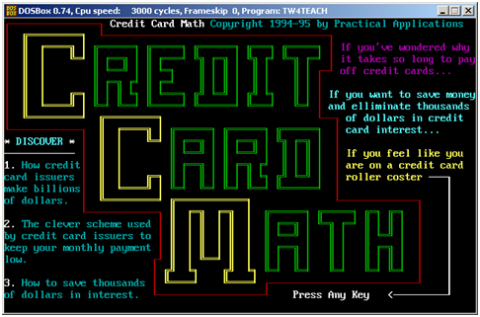
Here are some screen shots of Credit Card Math from 1994 - 2014

Credit Card Math 2014: Delphi XE4
Credit Card Math 2004: Delphi 5
Credit Card Math 1998: Delphi 3
Credit Card Math 1994: Turbo Pascal 5.5

Semper Fi,
Gunny Mike


end.

Wednesday, September 10, 2014

Taking the Mystery out of ListView Column Display

Here is a great article about how to display your data in columns using a ListView. Marjan does a fantastic job explaining how to modify the ListView so it displays your data in a nice column display. I'm definitely using this the next time I have a need.

Thank you Marjan!

How to get a ListView to display your values in columns

Enjoy - Semper Fi,
Gunny Mike
end.

Sunday, July 13, 2014

Video: Effectively Using Raize Components by Ray Konopka

I forgot what the RzMenuController from Raize Component did so I went back and watched the video Ray did at CodeRage 7 to remind me. Then I decided to make this list of links that jumps to a specific item for the next time I forget how to do something with one of these controls.

Effectively Using Raize Components by Ray Konopka
  1. Edit Button (4:04)
  2. Menu Button (5:55)
  3. Menu Controller (7:18)
  4. Tray Icon (9:26)
  5. Line Component (11:29)
  6. Progress Display (12:24)
  7. LED Display (14:27)
  8. DBGrid (15:35)
  9. Track Bar (19:23)
  10. Radio Group (24:42)
  11. Persistence Property Store (27:05)

Enjoy - Semper Fi
Gunny Mike
end.

Friday, July 11, 2014

How to Replace Global Variables by Using a Static Class

One of the first things I used to do when creating a new Delphi application was add a copy of the almighty global.pas unit to the project. I'd immediately go in to this file and start tweaking this and tweaking that so it would work with my new application. And, I made sure to ALWAYS add Globals to the uses clause of every new form I created.

My Delphi buddy Bob Wight, who is Scottish and speaks with a very heavy brogue, called his "Globs". Which stood for globs.pas. I remember him saying, "The programmer's life. Another day, another global." It sounds really cool with his Scottish accent.

Anyway, I thought this was the normal way of doing stuff. I thought every Delphi programmer did this. I never challenged it. Not ever.

Now, as I'm re-learning Delphi all over again for the first time, I hear several Delphi people, in the various Delphi hangouts, say stuff like, "Never use global variables" and "Pretend like global variables don't exist".

I'm thinking to myself... "Okay how the heck do you program if you can't use global variables?"

So, last weekend learned how to replace global variables in my Delphi application by using what is called a static class. It turns out that a static class can simply exist without having to be instantiated. That is pretty cool.

A static class can have constants, variables, functions and procedures. Its like having global variables on steroids. I have replaced my globasl.pas file with a file called ApplicationInfo.pas. I've included a copy of this file below.

This is a fairly new concept for me and it will no doubt go through some changes and refactoring. But so far, I'm liking it.

Here's a couple ways I'm implementing the use of my TAppInfo static class.


The cool part is the Intelisense... I just type TApp and hit [Ctrl] + [Space] and I can pick the item I want. No more "Globs" for this Marine!

ApplicationInfo.pas

Enjoy - Semper Fi,
Gunny Mike
end.

Sunday, July 6, 2014

Just had to share - XE4 includes Beyond Compare

Wow, I just discovered that Delphi XE4 comes with Beyond Compare.

I right-clicked on the project-name from within Project Manager with the intent of choosing the Show in Explorer option when I noticed the Compare option at the bottom. I was pleasantly surprised to see Launch Beyond Compare.

There are two ways to launch Beyond Compare from within the IDE:


Makes me think I should spend more time exploring the IDE.

Enjoy - Semper Fi,
Gunny Mike
end.

Friday, July 4, 2014

Choose the Right Folder for Your Application Data

I'm in the process of updating an older program that will now use a local database. I followed my typical "old school" habits and quietly went about my way thinking "I'll just plop the database in a folder called Data that resides in the same location as the exe file. No big deal."

I figured, I'll just use the reliable ExtractFilePath(Application.ExeName) to get the location of where this Data folder needs to go. Right?

Wrong!

I had forgotten to think about how Delphi's "debug" and "release" paths will play into this scenario. Not to mention 32Bit and 64Bit targets. I'm only focused on creating a Windows product at the moment, so for me this means there are a minimum of five paths:

Source
Source\Win32\Debug
Source\Win32\Release
Source\Win64\Debug
Source\Win64\Release

I know I could use "Post-Build" commands (Project > Options > Build Events) to make sure the files are copied from the $(PROJECTDIR) to the $(OUTPUTDIR). However, I was thinking that this is not a very efficient way to go about it. Did I really want to have five copies of a 140MB database cluttering up my hard drive. The answer is no.

So I posed the question "Looking for best practice for using single-user local database." to the Delphi Community on Google+ (https://plus.google.com/u/0/105522328114529031567/posts/Q8go8eWRAfz)

I received several comments and the consensus was to use an application specific subfolder of CommonAppData. Fair enough. CommonAppData it is. What the heck is CommonAppData?

I tend to be a "Show Me" guy I decided to dive into this head long and found out that CommonAppData actually refers to the folder called C:\ProgramData.

Then I wondered what all the other "AppData" type folders were. So I wrote a simple little program to help figure this out. It turns out there are 17 different AppData folders on my computer. I've included a copy of my program for you to use.

AppData Only: Sorted by Path Column

DFM:
object Form1: TForm1
  Left = 0
  Top = 0
  Caption = 'Paths'
  ClientHeight = 411
  ClientWidth = 804
  Color = clBtnFace
  Font.Charset = DEFAULT_CHARSET
  Font.Color = clWindowText
  Font.Height = -11
  Font.Name = 'Tahoma'
  Font.Style = []
  OldCreateOrder = False
  OnResize = FormResize
  OnShow = FormShow
  DesignSize = (
    804
    411)
  PixelsPerInch = 96
  TextHeight = 13
  object StringGrid1: TStringGrid
    Left = 16
    Top = 39
    Width = 772
    Height = 354
    Anchors = [akLeft, akTop, akRight, akBottom]
    ColCount = 3
    FixedCols = 0
    Font.Charset = DEFAULT_CHARSET
    Font.Color = clWindowText
    Font.Height = -11
    Font.Name = 'Tahoma'
    Font.Style = []
    Options = [goFixedVertLine, goFixedHorzLine, goVertLine, goHorzLine, goRangeSelect, goFixedRowClick]
    ParentFont = False
    TabOrder = 0
    OnFixedCellClick = StringGrid1FixedCellClick
  end
  object Button1: TButton
    Left = 16
    Top = 8
    Width = 75
    Height = 25
    Caption = 'Close'
    TabOrder = 1
    OnClick = Button1Click
  end
  object Button2: TButton
    Left = 97
    Top = 8
    Width = 75
    Height = 25
    Caption = 'Get Folders'
    TabOrder = 2
    OnClick = Button2Click
  end
  object CheckBox1: TCheckBox
    Left = 184
    Top = 12
    Width = 97
    Height = 17
    Caption = 'AppData Only'
    TabOrder = 3
    OnClick = Button2Click
  end
end


Program:


Enjoy - Semper Fi,
Gunny Mike
end.

Tuesday, May 20, 2014

Changing the Cursor in FireMonkey

I just watched a video on How to Change the Cursor in FireMonkey by Alister Christie. As I watched this video I learned just how much of a Delphi noob I really am. I had no idea you could go from in-line code to class to interface.


Thank you Alister for a great video and mind-opening experience.

Semper Fi,
Gunny Mike
end.

Friday, May 16, 2014

Make the Most of EMBT's DocWiki

I'm just getting ready to explore chapter 3 of Cary Jensen's Delphi in Depth: ClientDataSets and I stopped to research one of the DataSetProvider options - poFetchDetailsOnDemand.

So, I highlighted the poFetchDetailsOnDemand option in the Object Inspector and pushed F1. It brings up the woefully inadequate local help reference. I was expecting to see a list of all the options with their associated meanings.

Then I googled delphi poFetchDetailsOnDemand, not what I was looking for.

So then I googled site:docwiki.embarcadero.com poFetchDetailsOnDemand

Google Search Syntax:
http://google.com/search?q=site%3Adocwiki.embarcadero.com+poFetchDetailsOnDemand

And... poof... perfect... just what I was looking for.

EMBT should redirect the F1-key to do a web search on their DocWiki and do away with the local help.

Enjoy!

Semper Fi,
Gunny Mike
end.

Thursday, April 17, 2014

Are Your Software Sales Where They Should Be?

As an Independent Software Vendor running a one-person, part-time business I'm always wondering if sales are where they should be. If I'm honest with myself I say "No". Trying to understand why can be a very difficult.

I rediscovered this article called "If No Independent Developers Are 100 Times Smarter Than You, Then Why Do Some Get 100 Times the Results?" written by Steve Pavlina when he was President of the Association of Software Professionals.

I remember reading Pavlina's article about 10 years ago and thinking to myself this is something that should be read and re-read often. Unfortunately, I forgot to bookmark the article back then and had a hard time finding it.

Last year I joined the ASP and found this article on one of the resource pages. It's still a good read.

http://asp-software.org/www/misv_resources/business-articles/results/

Enjoy!

Semper Fi,
Gunny Mike
end.

Sunday, March 9, 2014

Get More out of StackOverflow

It's no secret that StackOverflow or SO as it's commonly referred to is one of the best resources for Delphi enthusiasts. We all have some favorite questions, favorite answers and favorite users out there.

What makes StackOverflow so useful are tags. Tags are the single most important feature. Here is a snippet of what you see when you search tags for Delphi:

StackOverflow Tag Search - Delphi


If you mouseover a tag there is a little pop-up that gives a description of the tag along with some very interesting links. One of the most interesting links is the "top users" link. This "top users" link is how you can get more out of StackOverflow.

By following this link you get a list of which users have answered the most questions and which users have asked the most questions relating to this tag. By drilling down onto the users profile, you can see all the answers and questions this user has participated in.

You can very quickly build a list of your favorite StackOverflow Delphi users. Reading answers by these users will most definitely increase your knowledge about Delphi.

Delphi Tags Top Users
http://stackoverflow.com/tags/delphi/topusers
http://stackoverflow.com/tags/delphi-xe5/topusers
http://stackoverflow.com/tags/delphi-xe4/topusers
http://stackoverflow.com/tags/delphi-xe3/topusers
http://stackoverflow.com/tags/delphi-xe2/topusers
http://stackoverflow.com/tags/delphi-xe/topusers
http://stackoverflow.com/tags/delphi-2010/topusers
http://stackoverflow.com/tags/delphi-7/topusers

FireMonkey Tags Top Users
http://stackoverflow.com/tags/firemonkey/topusers
http://stackoverflow.com/tags/firemonkey-fm3/topusers
http://stackoverflow.com/tags/firemonkey-fm2/topusers

Semper Fi,
Gunny Mike
end.

Saturday, March 8, 2014

Delphi Product and Compiler Versions Quick Reference

I was doing some research on Delphi ClientDataSet QC issues at http://qc.embarcadero.com/ and noticed that the Delphi Product Versions are reported as 18.0, 16.4, etc. When an issue is resolved they show the Resolved in Build as XE5 or sometimes they show it as a number such as 17.0.

When I think of Delphi versions I think of XE5, XE4, D7. I don't think of 19, or 18, or 7. Here is an Embarcadero quick reference webpage that lists all the different Product versions for Delphi.

http://docwiki.embarcadero.com/RADStudio/XE5/en/Compiler_Versions

Up Thru Tokyo
http://docwiki.embarcadero.com/RADStudio/Tokyo/en/Compiler_Versions


Semper Fi,
Gunny Mike
zilchworks.com

Tuesday, January 14, 2014

Embarcadero's Upgrade Policy is Deceiving

I am so frustrated and angry with Embarcadero right now. You have no idea how angry I am. Embarcadero's upgrade pricing policy is deceiving.


I upgraded to XE4 Enterprise from D2010 Professional in May of 2013. I blogged about my decision on May 19, 2013. (You can read about it here)


My upgrade decision was mostly made based on Embarcadero stating that the upgrade to XE4 is only valid for users of D2010 and higher. I did not want to miss out on an opportunity. It only stood to reason that when XE5 came out Embarcadero would only allow upgrade pricing from XE and higher.


Like all of you, I received all the year end marketing emails from Embarcadero. Needless to say, I did not take advantage of these year end offers.


I continued to receive upgrade notifications from Embarcadero. So, I decided to follow the embedded links within the email and now I discover that Embarcadero is allowing upgrades to XE5 to users of D2009 and higher.


THIS IS AN OUTRAGE


If I had waited a few short months I could have spent my upgrade money and received XE5. Now, I have XE4 Enterprise and it's going to cost me another 1,500 dollars to upgrade to XE5. This has got me so angry I don't know what to do. (I'm one pissed off Marine)


I'm a die-hard Delphi fanatic like most of you are. I have a love/hate relationship with Delphi mainly because it takes so dang long to learn how to do something in Delphi and after you figure out how to do it you say to yourself... "It shouldn't have taken that long."


I'm starting to really resent Embarcadero for what I consider to be deceptive marketing and upgrade policies.


I am not a happy camper right now.


Gunny Mike
end.

Sunday, November 10, 2013

Everyone Needs A Miyagi

Today is the Marine Corps' 238th birthday. Although I've been out of the Marine Corps since 1999 there's a saying that all Marines live by... "You can take the man out of the Marine Corps but you can't take the Marine Corps out of the man."

I just received a traditional "Happy Birthday" text response on my phone from Mitch Perry, one of my best friends of my Marine Corps days. I love this guy. Here's what he said...
"Same to you bud! I am sitting here drinking coffee in my dress blue coat, I might be losing it... HELP? Oh oh oh life goes on !"
So this got me thinking back to my earlier days in the Marine Corps. When you spend 20 years in the Marines you meet a lot of people. When I was a young Marine on my first four year enlistment I met a Marine named Staff Sergeant Reggie Wournos. Reggie was my Miyagi.

Reggie was one of the most squared away Marines I ever met. He taught me the Marine Corps version of "Wax on... Wax off", "Paint the fence" and "Sand the floor".

I'm not the only one that Reggie helped along the way. He took several of us young Marines under his wing and nurtured us along. If you ask the entire group of enlisted Marines from Headquarters and Maintenance Squadron 16, GSE - MCAS Tustin you will find you get the same type of response.  Here's a picture. Reggie is front row left in the bottom photograph.

This would be an awesome story if it ended right here, but it doesn't. For those of you that don't know how military life works, everybody moves on to new locations after 2-3 years. So, you get to hang with the same group of guys for a year or two and then you, or they, or both move on.

A few years later I'm working at MCAS Cherry Point, North Carolina. I had been promoted a couple times and now I was a sergeant. I have a new boss named Gunnery Sergeant Bill Wallace. You guessed it he's Miyagi #2. Wallace taught me a different set of skills. Wallace had the reputation both inside and outside of our organization as the "guy who's got his shit together".

So, you could say I was a lucky guy to have two Miyagi's. But if you can believe it, this gets even better.

In 2008 a bunch of us from GSE (the 1980 group) decide to get together in Memphis for a weekend. Most of us haven't seen each other in 25+ years. It was a pretty awesome time. So, I made public toast to Reggie thanking him for his early mentoring and telling him that he was my Miyagi. Everyone felt the same... Reggie is just one of those guys.

Later that evening I was having a private conversation with Reggie. We were both retired, me as a Gunnery Sergeant and Reggie as Chief Warrant Officer 4. I thanked him for being my Miyagi which he humble tried to deny. Then I asked him who his Miyagi was?

He looked at me and said "Bill Wallace".

Happy Birthday Marines
Semper Fi
Gunny Mike
zilchworks.com

Saturday, August 24, 2013

The One Manual Every Delphi Programmer Should Have!


I have always stayed away from using Delphi's DBGrid because it gave me the feeling of being in the cockpit of an airplane without a clue, as to what all the controls are, or even where to look first. I've decided to roll up my sleeves and get over my fear and anxiety of Delphi's DBGrid.

I'm currently using XE4 and I've been struggling with data validation within a DBGrid as you can see from a recent SO post How to get the value that caused the TDBGridInplaceEdit error?

After reading the answer I got from @bummi, I started googling related topics. Then I remembered I have a copy of Borland's Delphi 7 Developer's Guide.


Delphi 7 Developer's Guide

I quickly turned to Chapter 25 and found all the information I need to know, written in a friendly and very informative way. It's perfect. Each topic builds upon the previous topic giving a full treatment of the subject matter. Here is the table of contents for Chapter 25 of Borland's Delphi 7 Developer Guide:

Chapter 25Page
Working with field components 25-1
Dynamic field components 25-2
Persistent field components 25-3
    Creating persistent fields 25-4
    Arranging persistent fields 25-5
    Defining new persistent fields 25-5
        Defining a data field 25-6
        Defining a calculated field 25-7
        Programming a calculated field 25-8
        Defining a lookup field 25-9
        Defining an aggregate field 25-10
    Deleting persistent field components 25-11
    Setting persistent field properties and events 25-11
        Setting display and edit properties at design time 25-11
        Setting field component properties at runtime 25-13
        Creating attribute sets for field components 25-13
        Associating attribute sets with field components 25-14
        Removing attribute associations 25-14
        Controlling and masking user input 25-15
        Using default formatting for numeric, date, and time fields 25-15
        Handling events 25-16
Working with field component methods at runtime 25-17
Displaying, converting, and accessing field values 25-18
    Displaying field component values in standard controls 25-18
    Converting field values 25-19
    Accessing field values with the default dataset property 25-20
    Accessing field values with a dataset’s Fields property 25-21
    Accessing field values with a dataset’s FieldByName method 25-21
Setting a default value for a field 25-22
Working with constraints 25-22
    Creating a custom constraint 25-22
    Using server constraints 25-23
Using object fields 25-23
    Displaying ADT and array fields 25-24
    Working with ADT fields 25-25
        Using persistent field components 25-25
        Using the dataset’s FieldByName method 25-25
        Using the dateset’s FieldValues property 25-25
        Using the ADT field’s FieldValues property 25-26
        Using the ADT field’s Fields property 25-26
    Working with array fields 25-26
        Using persistent fields 25-26
        Using the array field’s FieldValues property 25-27
        Using the array field’s Fields property 25-27
    Working with dataset fields 25-27
        Displaying dataset fields 25-27
        Accessing data in a nested dataset 25-28
    Working with reference fields 25-28
        Displaying reference fields 25-28
        Accessing data in a reference field 25-29

I've already printed out Chapter 25 and plan to study it this weekend. The manual is 1,106 pages long. I plan on printing the chapters I need as I go. And yes I did buy paper that's already punched with 3-holes.

I don't care what version of Delphi you are using this manual is relevant and will make your life easier. Download your copy of Borland's Delphi 7 Developer Guide now!

If we could only get EMBT to create an updated version of this Delphi classic!

Semper Fi,
Gunny Mike
end.

Sunday, August 11, 2013

Format Numbers with an ElevateDB Function

There are times when I want numeric data coming out of a database formatted with a thousands separator and set number of decimal places. I'd rather see large numbers formatted as 123,740.00 rather than 123740. To me formatted numbers are just easier to read. Unfortunately, ElevateDB does not have a built in function similar to Microsoft's CONVERT.

However, you can create your own CONVERT function within ElevateDB quite easily. ElevateDB has two statements that make the job of formating numbers fairly easy. The first is the LABEL statement and the second is the LEAVE statement. The LABEL statement lets you set up a block of code. For example:
MyFistLabel:
BEGIN
  Do Something1;
  Do Something2;
  Do Something3;
  Do Something4;
  Do Something5;
END; --MyFistLabel
The LEAVE statement lets you exit a block of code. For Example:
MyFistLabel:
BEGIN
  Do Something1;
  Do Something2;
  Do Something3;
  IF Something3 = Done THEN
    LEAVE MyFistLabel
  END IF;
  Do Something4;
  Do Something5;
END; --MyFistLabel
So let's set out to create a function that formats numbers. This function will have two input parameters Value and Decimals. Value is the number to be formatted and Decimals is the number of decimal places. I built this function using two labels. One label that handles zero decimal places and one label that handles non zero decimal places. Here is the stubbed out concept:
----------------------------------------------------------------
ProcessZeroDecimals:
----------------------------------------------------------------
BEGIN
  -- Exit if Decimals parameter is other than 0 (zero)
  IF DECIMALS <> 0 THEN LEAVE ProcessZeroDecimals; END IF;
  -- Perform if Decimals parameter is equal to 0 (zero)
  Code Goes Here
  Code Goes Here
  Code Goes Here
----------------------------------------------------------------
END;--ProcessZeroDecimals:
----------------------------------------------------------------

----------------------------------------------------------------
ProcessNonZeroDecimals:
----------------------------------------------------------------
BEGIN
  -- Exit if Decimals parameter is equal to 0 (zero)
  IF DECIMALS = 0 THEN LEAVE ProcessNonZeroDecimals; END IF;
  -- Perform if Decimals parameter is other than 0 (zero)
  Code Goes Here
  Code Goes Here
  Code Goes Here
----------------------------------------------------------------
END; --ProcessNonZeroDecimals:
----------------------------------------------------------------
By testing the value of Decimals first we will either decide to LEAVE the code block or perform the code within that code block. The use of LABEL combined with the LEAVE statement makes for a very elegant solution. Here is the complete ElevateDB funtion:
CREATE FUNCTION "fFormatThousands"
(
 INOUT "Value" DECIMAL(19,4)
,INOUT "Decimals" INTEGER
)
RETURNS VARCHAR(20) COLLATE UNI_WI
BEGIN

DECLARE Separator VARCHAR(1);
DECLARE Str1      VARCHAR(30);
DECLARE Str2      VARCHAR(30);

DECLARE StrLength  INTEGER;
DECLARE ZeroPad    INTEGER;
DECLARE DecimalPos INTEGER;

DECLARE i INTEGER;
DECLARE j INTEGER;

SET Separator = ',';
SET Str1      = '';
SET Str2      = '';
SET ZeroPad   = 0;

CASE DECIMALS
  WHEN 0 THEN SET Value = ROUND(Value to 0);
  WHEN 1 THEN SET Value = ROUND(Value to 1);
  WHEN 2 THEN SET Value = ROUND(Value to 2);
  WHEN 3 THEN SET Value = ROUND(Value to 3);
  WHEN 4 THEN SET Value = ROUND(Value to 4);
  ELSE
    BEGIN
      SET Value = ROUND(Value to 2);
      SET Decimals = 2;
    END;
END CASE;
SET Str1 = CAST(Value as VARCHAR);

----------------------------------------------------------------
ProcessZeroDecimals:
----------------------------------------------------------------
BEGIN
  -- Exit if Decimals parameter is other than 0 (zero)
  IF DECIMALS <> 0 THEN LEAVE ProcessZeroDecimals; END IF;
  -- Perform if Decimals parameter is equal to 0 (zero)
  SET StrLength = LENGTH(Str1);
  SET Str2 = '';
  SET i = 0;
  SET j = StrLength;
  WHILE j > 0 DO
    SET Str2 = SUBSTRING(Str1, j for 1) + Str2;
    SET i = i + 1;
    SET j = j - 1;
    IF (i MOD 3 = 0) AND (j > 0) THEN
      SET Str2 = Separator + Str2;
    END IF;
  END WHILE;
----------------------------------------------------------------
END;--ProcessZeroDecimals:
----------------------------------------------------------------

----------------------------------------------------------------
ProcessNonZeroDecimals:
----------------------------------------------------------------
BEGIN
  -- Exit if Decimals parameter is equal to 0 (zero)
  IF DECIMALS = 0 THEN LEAVE ProcessNonZeroDecimals; END IF;
  -- Perform if Decimals parameter is other than 0 (zero)
  SET DecimalPos = POSITION('.' IN Str1);
  IF DecimalPos = 0 then
    CASE Decimals
      WHEN 1 THEN SET Str1 = Str1 + '.0';
      WHEN 2 THEN SET Str1 = Str1 + '.00';
      WHEN 3 THEN SET Str1 = Str1 + '.000';
      WHEN 4 THEN SET Str1 = Str1 + '.00000';
    END Case;
  END IF;
  SET StrLength = LENGTH(Str1);
  SET DecimalPos = POSITION('.' IN Str1);
  SET ZeroPad = Decimals - (StrLength - DecimalPos);
  SET Str2 = SUBSTRING(Str1, DecimalPos for Decimals+1);
  SET i = 0;
  SET j = DecimalPos -1;
  WHILE j > 0 DO
    SET Str2 = SUBSTRING(Str1, j for 1) + Str2;
    SET i = i + 1;
    SET j = j - 1;
    IF (i MOD 3 = 0) AND (j > 0) THEN
      SET Str2 = Separator + Str2;
    END IF;
  END WHILE;
  CASE ZeroPad
    WHEN 1 THEN SET Str2 = Str2 + '0';
    WHEN 2 THEN SET Str2 = Str2 + '00';
    WHEN 3 THEN SET Str2 = Str2 + '000';
    WHEN 4 THEN SET Str2 = Str2 + '0000';
  END CASE;
----------------------------------------------------------------
END; --ProcessNonZeroDecimals:
----------------------------------------------------------------

RETURN str2; 

END
VERSION 1.00!
Here is the fFormatThousands function at work against the DBDemos database.
SELECT
 OrderNo
,CustNo
,fFormatThousands(ItemsTotal,2) as "Items Total"
,fFormatThousands(AmountPaid,2) as "Amount Paid"
,fFormatThousands(ItemsTotal - AmountPaid,2) as "Balance Due"
FROM orders
ORDER BY
ItemsTotal - AmountPaid DESC;

 
Semper Fi,
Gunny Mike
end.

Tuesday, July 23, 2013

David I to Discuss Mobile & Mac at the 2013 ISVCon

The 2013 Independent Software Vendor Conference (ISVCon), scheduled for September 27-29, 2013 at the Atlantis Casino Resort in Reno, Nevada, has released information about the panel discussions and seminars that will be presented. Designed to deliver the latest marketing ideas to small software development firms, this year’s conference includes:
  • “Sell Software on Facebook” by Nico Westerdale of BitsDuJour – Can independent software vendors (ISVs) make money selling software on Facebook? Yes. More than half of the people in the US have Facebook accounts. Learn practical ways to build your fanbase, and create posts that generate traffic.
  • “Conversations to Create More Customers” by Jessica Dewell of Red Direction – Move more software customers through your company’s sales cycle by changing from reactive conversations (such as answering email inquiries) to proactive conversations (such as listening and starting conversations.)
  • “Growing your ISV business to Multi-Device with Mobile and Mac” by David Interstimone (David I) of Embarcadero – Discover how to increase software sales by supporting a mix of client devices, UI approaches, OS versions, and emerging form factors.
  • “Connected Apps: The New Normal” by Leyla Seka of Salesforce.com – Learn to build and deploy connected apps as your software development business evolves from the desktop/laptop world to the cloud and mobile environments.
  • “33 High Tech Business Myths, and How They Can Hurt Your Company” by Gary Elfring of Elfring Fonts Inc. – Gain insights into distinguishing between valid business ideas and the myths, folklore, and misinformation that can hurt your company.
  • “Google AdWords – Winning the War and Making It Work” by Aaron Weiner of Software Promotions – Learn how recent AdWords changes will impact your account’s performance, and how you can overcome any problems.
Other seminar titles include:
  • Practical Roadmap to High Performing Websites
  • Secondary Offer Networks
  • The Cloud for ISVs
  • Avoiding Problems When Hiring and Working with Freelancers
Visit http://www.isvcon.org/speakers.php to read about new seminars that will be added during the summer.

Sign up for the conference by September 22 to take advantage of ISVCon’s $820.50(US) registration fee. Registration includes three days of intense education and networking opportunities plus a Thursday evening reception, and break rooms full of snacks and helpful representatives from the conference’s sponsors.

Previously known as the Software Industry Conference (SIC), ISVCon carries on a 22 year tradition of supporting independent software developers’ business and marketing efforts with seminars, presentations, and networking opportunities.

ISVCon is owned and presented by The Association of Software Professionals. Sponsors for ISVCon 2013 include FastSpring, Avangate, Tightrope Interactive, Software Promotions, Greentram Software, and The Association of Software Professionals. Visit http://www.isvcon.org/ for more information about attending ISVCon 2013. Or visit http://www.isvcon.org/sponsors.php for information about sponsoring the conference.

Semper Fi
Gunny Mike
end.