Update 2023-02-28: Embarcadero has updated their docwick to be more user friendly when it comes to Delphi code examples. Here is a link to all the Delphi 11 code examples;
Enjoy!
Semper Fi,
Gunny Mike
zilchworks.com
...simply trying to port the Raize Components controls over to FireMonkey is probably not a good use of resources and would not have the same impact that the product has on the VCL side.I'm a such a FireMonkey noob I won't be much help in building a FireMonkey "wish list". Here's where you FireMonkey guys come in. If you have a nit-pick about a standard FireMonkey control or if you find yourself frustrated because the standard FireMonkey controls makes things difficult Ray wants to hear about it.
Instead, our plan is to determine those tasks that are difficult for developers to accomplish in FireMonkey and provide custom FireMonkey controls to address those needs. There may be some controls that are similar in design to a Raize Components controls, but will be specifically designed for FireMonkey. In fact, it will probably be a new product line.
Unfortunately, I do not have any specifics to share at this time. But I would encourage you to share with us your experiences with FireMonkey and what specific tasks are difficult for you to accomplish. We've been building a list of our own, but the more feedback we can get the better.
Ray
end.
 |
| PDOXUSRS.NET error |


end.
 |
| CD Collecter - Sample Delphi Application that comes with ElevateDB |
"No, it won't, at least not until we have Mac support for EDB added. I'mThat is very exciting news for all of us that use ElevateDB.
hoping to have it done before the end of summer." (read entire thread)
end.
 |
| Black Left Edge Appears When Clicking Column Heading |
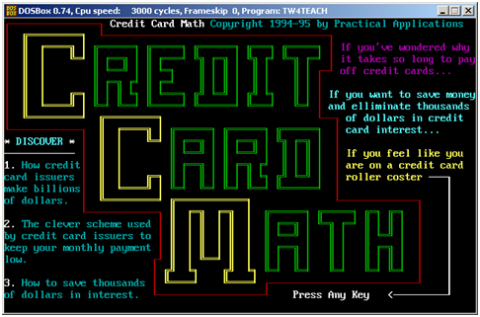 |
| Credit Card Math 1994: Turbo Pascal 5.5 |
 |
| Credit Card Math 1994: Turbo Pascal 5.5 |
 |
| Credit Card Math 1998: Delphi 3 |
 |
| Credit Card Math 2004: Delphi 5 |
 |
| Credit Card Math 2013: Delphi 2010 (1st Attempt) |
 |
| Credit Card Math 2013: Delphi 2010 (2nd Attempt) |
I've been trying to follow all the talk about what is going on with Delphi and WinRT ever since Allen Bauer's post went viral. I'm not as smart as most of you Delphi guys. Can someone please explain in very simplistic terms what it means when Delphi either can't or is excluded from creating WinRT apps? How does this effect a Micro-ISV like myself in terms of distribution and sales?I received this response...
For example, you will probably not be able to sell your app through the MS Application Store, which could really hurt your exposure to prospective new customers.Okay. So I started googling Microsoft App Store and discovered a couple interesting tidbits.
| Id | Value |
| 1 | Blue |
| 2 | Green |
| 3 | Red |
| 4 | Yellow |

Procedure SetComboBoxValue(var cb:TRzComboBox; x:integer);
var i :integer;
begin
  for i := 0 to cb.Count - 1 do
    if x = StrToInt(cb.Values[i]) then
    begin
      cb.ItemIndex := i;
      Exit;
    end;
end;
As you can see, it simply iterates through the list of values looking for a match and when found it Exits. 
object Form1: TForm1
  Left = 0
  Top = 0
  Caption = 'Form1'
  ClientHeight = 203
  ClientWidth = 226
  Color = clBtnFace
  Font.Charset = DEFAULT_CHARSET
  Font.Color = clWindowText
  Font.Height = -11
  Font.Name = 'Tahoma'
  Font.Style = []
  OldCreateOrder = False
  PixelsPerInch = 96
  TextHeight = 13
  object RzButton1: TRzButton
    Left = 64
    Top = 112
    Width = 110
    Caption = 'Value = 1'
    TabOrder = 0
    OnClick = RzButton1Click
  end
  object RzComboBox1: TRzComboBox
    Left = 64
    Top = 32
    Width = 110
    Height = 21
    TabOrder = 1
    Text = 'One'
    OnChange = RzComboBox1Change
    Items.Strings = (
      'One'
      'Two'
      'Three'
      'Four'
      'Five'
      'Six'
      'Seven'
      'One Hundred'
      'Nine Nine Nine')
    ItemIndex = 0
    Values.Strings = (
      '1'
      '2'
      '3'
      '4'
      '5'
      '6'
      '7'
      '100'
      '999')
  end
end
unit SetComboBox;

interface

uses
  Windows, Messages, SysUtils, Variants, Classes, Graphics, Controls,
  Forms, Dialogs, StdCtrls, RzCmboBx, RzButton;

type
  TForm1 = class(TForm)
    RzButton1: TRzButton;
    RzComboBox1: TRzComboBox;
    procedure RzButton1Click(Sender: TObject);
    procedure RzComboBox1Change(Sender: TObject);
  private
    { Private declarations }
  public
    { Public declarations }
  end;

  Procedure SetComboBoxValue(var cb:TRzComboBox; x:integer);
var
  Form1: TForm1;

implementation

{$R *.dfm}

Procedure SetComboBoxValue(var cb:TRzComboBox; x:integer);
var i :integer;
begin
  for i := 0 to cb.Count - 1 do
    if x = StrToInt(cb.Values[i]) then
    begin
      cb.ItemIndex := i;
      Exit;
    end;
end;

procedure TForm1.RzButton1Click(Sender: TObject);
var
  i,j : integer;
begin
  i := Random(RzComboBox1.Count);
  j := StrToInt(RzComboBox1.Values[i]);
  RzButton1.Caption := 'Value = ' + IntToStr(j);
  SetComboBoxValue(RzComboBox1,j);
end;

procedure TForm1.RzComboBox1Change(Sender: TObject);
begin
  RzButton1.Caption := 'Value = ' + RzComboBox1.Value;
end;

end.


 |
|
'---------------------------------
' Microsoft SQL
'---------------------------------
DECLARE @Money money
SET @Money = 12.345
SELECT CONVERT (varchar(10),@Money,1)
'---------------------------------
12.35
But that's not how Delphi does it.
'---------------------------------
' Delphi 2010
'---------------------------------
procedure TForm1.Button1Click(Sender: TObject);
var
  s : string;
  c : currency;
begin
  c := 12.345;
  s := '';
  s := s + 'Value ' + FloatToStr(c);
  s := s + Chr(13);
  s := s + Format('Formatted as money = %m',[c]);
  ShowMessage(s);
end;

function RoundCurrency(const Value: Currency): Currency;
var
  V64: Int64 absolute Result;
  Decimals: Integer;
begin
  Result := Value;
  Decimals := V64 mod 100;
  Dec(V64, Decimals);
  case Decimals of
    -99 .. -50 : Dec(V64, 100);
    50 .. 99 : Inc(V64, 100);
  end;
end;

procedure TForm1.Button1Click(Sender: TObject);
var
  s : string;
  c : currency;
begin
  c := 12.345;
  s := '';
  s := s + 'Value ' + FloatToStr(c);
  s := s + Chr(13);
  s := s + Format('Formatted as money = %m',[c]);
  s := s + Chr(13);
  s := s + Chr(13);
  s := s + 'Using the RoundCurrency function';
  s := s + Chr(13);
  s := s + Format('Formatted as money = %m',[RoundCurrency(c)]);
  ShowMessage(s);
end;

"Why not add this as a comment in your Delphi code."So that's what I did.
{
----------------------------------------------------------------
FireMonkey Consideration:
----------------------------------------------------------------
Question asked on stackoverflow:
http://stackoverflow.com/questions/10564505
I'm rewriting an old application using Delphi 2010 and I'd like
to put placeholders in my code for when I port it over to XE2.
Just curious if FireMonkey has an equivilent to GetSystemMetrics.
I'm specifically interested in:

GetSystemMetrics(SM_CXSCREEN)
GetSystemMetrics(SM_CYSCREEN)
----------------------------------------------------------------
If you just need the main monitor size, and not the desktop size
(n monitors sum), you can use this:

uses ..., FMX.Platform;

var   p: TPointF;
begin
  p := Platform.GetScreenSize;
  ShowMessage(Format('X: %f' + LineFeed + 'Y: %f', [p.X, p.Y]));

From: Whiler
http://blogs.wittwer.fr/whiler/
----------------------------------------------------------------
}
unit IniFileStuff;

interface

uses
  Windows, SysUtils, Forms, IniFiles;

type
  TScreenType  = (MainScreen, PreviewScreen);

Procedure InitializeIniFile();
Procedure ResetScreenSection(ScreenType:TScreenType);
Function WindowStateToInt(WSType:TWindowState):integer;
Function IntToWindowState(WSInt:integer):TWindowState;
...
End Code Snippet 
procedure TScreenResolution.Button1Click(Sender: TObject);
var
  MonInfo: TMonitorInfo;
  ScreenW, ScreenH : integer;
begin
  MonInfo.cbSize := SizeOf(MonInfo);
  GetMonitorInfo(MonitorFromWindow(Handle, MONITOR_DEFAULTTONEAREST), @MonInfo);
  ScreenW :=  MonInfo.rcMonitor.Right  - MonInfo.rcMonitor.Left;
  ScreenH :=  MonInfo.rcMonitor.Bottom - MonInfo.rcMonitor.Top;
  Label2.Caption := IntToStr(ScreenW);
  Label4.Caption := IntToStr(ScreenH);
end;
Semper Fi - Gunny Mike
 |
| Image modifed to show all Type options |
"Michael, the reason for my vocabulary is simple, my parents. When I asked for the definition of a particular word they told me to look it up in the dictionary. And while you are reading about that word, read about every word on both facing pages."Jeff developed this habit when he was young and he still carrys it with him today. What a simple concept. I have decided to use this idea when I go looking up a the reference to a property or method of a Delph object. Not only am I going to read about the property I was intially interested in, I will read about all the other properties and methods.
One of the regulars, Roy, said why don't you just use the "built-in BDE migrator" that comes with ElevateDB.


 |
| Click Yes if prompted to create folder. |


 |
| Click OK when Done |


"My first thought was, great ReportBuilder doesn't let me do what I want to do. This sucks."Then I realized...
"It's not ReportBuilder, it's me. My thinking is wrong. Stored procedures are not meant to be reported on... they are meant to do the heavy lifting that makes the data easy to report against"I'm glad that this happened to me early on in the process. I would have been quite upset had I created a total database with 30-40 stored procedures all built on the assumption that they could be used as datasets for reporting.

I have spent the last two weeks researching different reporting tools for Delphi. I currently own Delphi 2010 Professional which comes with Rave built into the IDE. My customers have asked me for a "one-click" printing solution. Instead of previewing and printing each report one-at-a-time, they would like to simply press the [ Print ] buttton once and "presto" all the reports get printed. That is a fairly reasonable request.
So, now I'm looking to see how I can create a composite report. I like the idea of providing my customers with a "one-click" solution. However, the reports I need to create are a combination of portrait and landscape orientations. Now, the task has just gotten a little more trickier.
I need to create a composite report that allows a combination of portrait and landscape orientations.
I begin my quest for knowledge like I always do... StackOverflow. I quickly came across the following post regarding Rave. Migrating from QuickReport to FastReport, Rave Reports or what? This sounded interesting seeing how my older programs used Quick Reports. After reading some of the comments it further drove me away from Rave.
Hi,So, Quick Reports is out. That's too bad because I have already spent several hours with that tool even though it was eight years ago.
It can't be done with the present code. I'm not sure why but mixing report orientations just doesn't work.
Regards, QBS Software Ltd
At Digital Metaphors Corporation we believe that our existence is guaranteed only when we successfully complete the actions listed below on a daily basis:I started looking around their website for some nuggets and I came across a download called Learning ReportBuilder. This is a hands-on learning experience. It combines a 145 page step-by-step guide with a report builder tool that thoroughly teaches you how to use their product.
Create software of the highest quality Ensure that customers receive the maximum possible value from our software Go the extra mile in every phase of the software business Make things go right Regardless of circumstances, use intelligence, common sense, and inspiration to create results which are a service to both our customers and our fellow employees
Semper Fi,
Gunny Mike

