I'm always looking for ways to improve my Delphi skills. Sometimes, this takes me down a rabbit hole. And each time, these little side trips never answer "Yes" to the question "Will this help me ship?"
Last week I went down the "global variables are bad" rabbit hole. 🐇🕳
Global Variables Are Bad
I opened my copy of "The Delphi Magazine Total Collection" looking for some inspiration. And, I found a 6 Part series called "Effective Delphi Class Engineering" written by David Baer. I'm slowly working my way through these articles.
Issue: 57
Effective Delphi Class Engineering 1: Crossing The Chasm
David Baer kicks off a new series of articles aimed at all of us who are reluctant, confused or ill-informed on what object-oriented development is all
about. The goal is to demonstrate, clearly and without jargon-loaded obfuscation, how to design, create and use Delphi classes to make your
development more productive.
Issue: 59
Effective Delphi Class Engineering 2: Welcome To The Machine
David Baer continues his series on practical object orientation by putting Delphi’s object machinery under a magnifying glass. He examines topics
such as memory management, method calling, protocols and other compiler- related issues.
Issue: 60
Effective Delphi Class Engineering 3: Skyrocketing Property
David Baer thinks properties are wonderful and this month gives us insights and advice on how they can best be put to use in our classes.
Issue: 62
Effective Delphi Class Engineering Part 4: The TObject Of My
David Baer focuses on inheritance in this part of his popular series on object oriented development in Delphi.
Issue: 63
Effective Delphi Class Engineering Part 5: You Are TEgg Man... I AM TWalrus
David Baer has not gone mad (though he may have been listening to too many old Beatles albums!): this instalment of his series continues his
practical real-world discussion of polymorphism and inheritance.
Issue: 65
Effective Delphi Class Engineering Part 6: To Talk Of Many Things
David Baer concludes his series on developing Delphi classes with a miscellany of sound advice, ranging from events to exceptions, RTTI and
message handling.
Part 1 of Baer's series of articles, refenced short paper written by Marco Cantu called "When RAD is bad", which I found it on the internet archive.
OMG! I wish I had known this years ago. The Marine Corps taught me the Xerox Personal Selling Skills 3 (PSS3 = Needs Satisfaction) method. They turned me into a "regurgitator". If I had seen this video in 1994, it would have made a HUGE difference.
Show Me! Don't Tell Me!
HaveDemand your mentor model
the sales behavior for you!
Enjoy! Semper Fi, Gunny Mike https:\\zilchworks.com
I like the "Code Folding" feature of Delphi. However, I noticed that every time I reopened a project in Delphi 12 where I had previously folded the code, the code was no longer folded.
To keep your code folded in Delphi 12 you need to turn on the Save project desktop when closing option inside the IDE.
Tools > Options > IDE > Saving and Recovering
This option is unchecked in the default, out-of-the-box setup.
When selected, the current state for the views is saved before closing it. State info includes collapsed regions, cursor/caret position, and bookmarks.
This allows you to close and reopen a tab within the same editing session, and when the tab is reopened it will display exactly as it was when it was closed. This is similar to the Save project desktop when closing setting but functions all the time, not just when closing and reopening a whole project.
This option can only be enabled when Save project desktop when closing is checked.
Let me know in the comments what other out-of-the-box tweaks you like to make to a brand new Delphi install.
A couple months ago, I watch the video replay "The fundamental secrets of good UI design" done by Ian Barker. Around the 33:15 mark, Barker talks about supporting "dark mode", have a listen:
Transcript:
"One of the things you really should do at a very bare minimum if you do nothing else please support dark mode. And this is kind of a personal beg from me. As I said before I do get these floaters in my eyes, I can see perfectly well you know, I'm not blind or anything like that. I'm shortsighted which is why I have glasses but if you support dark mode you will make my life a lot easier. And other people that have visual issues as well some people get migraines and things like that dark mode helps."
Until I watched this video, I never considered supporting dark mode in the current rewrite of my Zilch software. So I began looking into how to incorporate FMX styles. It was confusing at first. Then I got the hang of it. I decided to go with the "Air.Style" that comes with Delphi.
There were a couple of tweaks I had to make. The Air.Style is a vector style which means it does not use the bitmap designer. It is similar to how Cascading Style Sheets are used in web development. The graphic elements are drawn using SVG paths.
FMX Main Menu component can't be styled
The biggest surprise was the TMainMenu component. It turns out the FMX Main Menu component can't be styled. The Embarcadero FMX Style Viewer was showing a Main Menu that was styled how come my Main Menu wasn't styled?
FMX Style Viewer - Air.Style
I didn't want my application to have some stuff styled and some stuff not styled. Then I discovered FMX includes a MenuBar component which does take styling. And that is what is used by the FMX Style Viewer. So, I slowly and methodically swapped out the MainMenu component for the MenuBar component.
Always use the MenuBar for FMX desktop applications
FMX MainMenu vs MenuBar
My recommendation is to skip using the MainMenu component when developing FMX desktop applications and ALWAYS use the MenuBar component.
Disclaimer: This post contains affiliate links, which means I may earn a small commission if you click through and make a purchase, at no extra cost to you. Your support helps keep this blog running – thank you!
The upgrade of my flagship product from Delphi 5 VCL to Delphi 11.3 FMX is finally at the presentation stage. I've spent the last six weeks thinking about and learning about data visualization.
I've never used FastReport before. My current Delphi 5 VCL product uses QuickReports. I did find a great FastReport video available through Embarcadero Academy called Getting Started with FastReport by Cary Jensen. Jensen mainly focuses on the VCL version of FastReport.
I've never used FastReport before
I was surprised at the huge difference between the VCL and FMX versions of the FastReport Embarcadero Editions. That's probably why Jensen focused on the VCL version in his video. These are the palette entries for Delphi 11.3 Professional. (VCL on the left, FMX on the right)
I'm interested in the FMX version of FastReport because I'm developing a desktop software product which targets Windows and macOS users. Because I'm new to FastReport, I want to see how far I can take the "Embarcadero" version of FastReport before I commit to purchasing the full version.
Unfortunately, the Embarcadero Edition of FMX FastReport has no export capability. See the Palette image above.
I was surprised at the huge difference between the VCL and FMX versions
Because I'm targeting both Windows and macOS users I need to know if there are any stark differences between those platforms. I created a comparison chart which highlights these differences. This is the same data from the Fast Reports website sorted by features with missing capabilities highlighted.
Here is the same comparison which filters out any features that are unavailable across all platforms.
As you can see, the Embarcadero Edition of FastReports 2.0 FMX is very limited.
The Bottom Line: Because my application is cross-platform for both Windows and macOS, it looks like I will have to purchase the full retail version of FastReport 2.0 FMX in order to give my customers the experience they expect.
Note: Some links in this post are affiliate links, meaning I may receive a small commission if you make a purchase. This helps support my work – thank you for your understanding.
Working with Date data can be very tricky. I recently encountered an "Invalid argument to date encode", error while trying to update a SQLite database table.
This placed a value of 0000-00-00 into the date field of my SQLite table.
The getter function GetOneOffDateAsDate passes in a TDate which doesn't play nicely with FireDAC. Fortunately, the fix is quite simple. I found a fantastic explanation for this error on stackoverflow which states FireDAC expects DATE data type values to be a string in the fixed format of YYYY-MM-DD.
FireDAC Expects DATE data types to be strings formatted as YYYY-MM-DD
So I created another getter function to format the date data as a YYYY-MM-DD string. Problem solved!
I'm currently updating an old Delphi 5 Desktop VCL application to to Delphi 11.3 FMX. And one of the capabilities I want to provide is the ability to launch several webpages from within the application. I want to place a link in the main menu to my YouTube channel so customers can easily get to product videos. And there's also a link to my website in the Help > About box.
It was fairly straightforward the last time I did this using VCL because all I had to worry about was the Windows side of things. However, because I want this application to run on both Windows and macOS it presented a challenge.
The Delphi IDE won't recognize the Macapi namespace unless the target is set to MacOS 64-bit
Harry Stahl covers the COCOA API on pages 98-99 of his book Cross-Platform Development with Delphi. He also gives an example of how to use the NSWorkspace object of Macapi.Appkit. However, he doesn't show how to setup the uses clause.
I also found a fantastic reference on stackoverflow by David Heffernan that was written in 2015. However, there are two issues with Heffernan's if you are looking for a complete answer:
There is a reference to a blog post by Malcolm Groves called Opening files and URLs in default applications in OS X which is no longer available or accessible.
The example doesn't tell you you need to target the MacOS 64-bit platform before the IDE will recognize Macapi namespace..
The Delphi IDE won't recognize the Macapi namespace unless the target is set to MacOS 64-bit. Shame on me for not reading up on the Embarcadero docs. Wrapping my head around how to use the {$IFDEF MSWindows} and the {$IFDEF MACOS} was a little tricky But I eventually caught on.
After a couple hours of going back and forth with code that worked for Windows but didn't work for macOS. And code that worked for macOS but didn't work for Windows, I finally got Heffernan's example to work.
The next step was to extract the code out of the main form and place it into it's own unit. And that is the code I'm sharing with you today. I hope you find this helpful.
I'm in the process of converting an old Delphi 5 VCL application to Delphi 11 FMX. Yeah, I have Delphi 12 but I'm waiting for the first bug release before I start using it. Well, this morning I learned a valuable lesson. A lesson which stopped me dead in my tracks.
There's nothing stopping you from creating an already existing type!
I was making some refactoring changes to my code. I didn't realize I was about to make a huge mistake. I went plodding ahead pleased with the progress I was making and admiring the beautiful, refactored code I was creating. When boom... I renamed a type that stepped on a type already inside the System.UITypes unit.
There's nothing to stop you from creating an already existing type. Of course I didn't use the preview changes function. I just hit go!
I had defined my own enumerated type called TMyImageIndex. I decided to just simply call it TImageIndex. So, that's what I did using Refactor > Rename type TMyImageIndexCTRL+SHIFT+E
I knew I messed up when I saw way too much code show up in the results panel.
How dare Embarcadero define a type called TImageIndex
WTF. If it already existed the IDE should have prevented me or at least warned me. How dare Embarcadero define a type called TImageIndex.
Disclaimer: This post contains affiliate links, which means I may earn a small commission if you click through and make a purchase, at no extra cost to you. Your support helps keep this blog running – thank you!
I am a big fan of Harry Stahl's book "Cross-Platform Development with Delphi 10.2 & FireMonkey for Windows, MAC OS X (macOS) & Linux". I purchased this book in May 2021 and it has helped me several times as I'm porting my Zilch application from Delphi 5 VCL to Delphi 11 FMX.
I like to maintain RSS feeds of my favorite Delphi blogs. So, I went looking to see if Stahl has a blog I could add to my Outlook RSS Feeds. I found a couple of Stahl's websites. He does have a few blog posts but they are not easily converted into an RSS feed.
Note: Some links in this post are affiliate links, meaning I may receive a small commission if you make a purchase. This helps support my work – thank you for your understanding.
Disclaimer: This post contains affiliate links, which means I may earn a small commission if you click through and make a purchase, at no extra cost to you. Your support helps keep this blog running – thank you!
When it comes to Delphi, it's amazing how much I don't know, once knew but forgot, or just plain skipped over because it was too mind-boggling at the time. I took a break from reading Alister Christie's new book "Code Better in Delphi", which I purchased last night, to write this blog post.
While reading the bit on "refactoring", I realized how little refactoring I actually put into practice. Yes, I have Fowler's book, the second edition. And no, I haven't read it. I've thumbed through it a little in the past. I even tried looking for the "Introduce Explaining Variable" refactor Christie discusses on page 53 of his book. It turns out Fowler now calls it "Extract Variable". Keeping Fowlers "Refactoring" book on my desk, and referring to it often, is one way I am going to code better in Delphi.
It's amazing how much I don't know or once knew but forgot
I just started reading "The Observer Pattern" in Christie's book and had to stop. I bought "Head First Design Patterns" by O'Reilly, quite a few years ago. I have the 10th Anniversary edition with code examples in Java 8. My intent was to install Java on my machine and force myself to learn these patterns by following the code in the book. It didn't go so well. The authors do a great job using story to make learning fun. I just couldn't wrap my head around Java.
Christie has managed to reignite my desire to learn these patterns. I downloaded the Java source code. I plan to work my way through "Head First Design Patterns" pasting the Java source code into ChatGPT, and asking Chat to convert it to Delphi.
I will navigate through each pattern using this method. I will then revisit the same pattern in Primoz Gabrijelcic's book "Hand-On Design Patterns with Delphi". This is another way I'm going to learn to code better in Delphi.
Another way is to revisit the Model-View-Controller method of code separation. Here is a the MVC song from 2007 I just learned about today.
And I also want to implement "Interfaces".
Here's my list of how I will code better in Delphi:
Finish reading Christie's book
Practice refactoring often
Learn and implement design patterns
Discover and utilize ways to separate code concerns such as MVC or MVVM
Overcome my stumbling block of Interfaces
Use the comments below to share how you will code better in Delphi.
Note: Some links in this post are affiliate links, meaning I may receive a small commission if you make a purchase. This helps support my work – thank you for your understanding.
Although the demo and source code for this presentation is based on a mobile app, the concept Konopka presents is not just for mobile apps. It's actually a blueprint for creating any type of FMX app using Delphi.
Blueprint for Creating Delphi FMX Apps
I was compelled to write this blog for two reasons. The first stems from the fact that this is not just for mobile app development, it's for any FMX app development. And number two, the concept is simple, powerful, and elegant.
It doesn't matter whether you are brand new to Delphi or a seasoned Delphi veteran, if you get the opportunity to download and study an application built by Konopka, TAKE IT. You will learn so much. It's an opportunity to explore the mind of Konopka.
Konopka embodies the meaning of my favorite quote from Albert Einstein. "Make everything as simple as possible but not simpler."
I have just started to explore Personal Knowledge Management (PKM). Didn't know it was a thing until a few days ago. Obsidian (https://obsidian.md) seems to be one of the most popular tools being used. This tutorial is a couple years old but it's very good.
Just finished working out the logic for handling file logic:
File Open File New File Save File Save As
This assumes you are keeping track of the following:
Current Filename
Changes to file data
I've been wrestling with this one for a few days. And then it finally hit me. "Hey, Exit can be your friend."
Exit can be your friend
Within the last year, my thinking has been influenced by Jeff Patton and his book "User Story Mapping". At work I have been involved in many meetings/discussions where everyone is in agreement that we need to implement "Solution X". However, everyone has their own interpretation of what "Solution X" is.
This is part 1 in a series dedicated to Delphi FMX Desktop development. I am in the process of converting an old VCL application to FMX. When I first started playing around with FMX I was excited because one code base could serve up all different platforms; desktop, mobile, tablet. FMX also let's you create Windows, Mac OSX, Android, iPhone apps from that same single code base.
It wasn't until recently that I discovered one code base doesn't easily translate between desktop and mobile. So I am focused solely on creating one desktop code base for Windows and Mac OSX. This is a conscious choice on my part to stay in the desktop market.
Over the last 32 years I have had several Mac OSX users asking me when I would have a version of my software that would work on their computers. Delphi FMX will let me make this happen.
This leads to a series of questions:
What does the desktop market share look like?
How many new Mac customers will this bring me?
Is it worth the effort to create a desktop application for both Windows and Mac?
How does geographical location influence the decision?
I would like to thank the people at statcounter GlobalStats for providing the information in this post. Visit https://gs.statcounter.com/ for more information.
"The Whole World's Gone Mobile! Forget Desktop Development."
Let's start by looking at the Desktop vs Mobile vs Tablet market share. We are going to look at the past year and then look at the past ten years. This will show the huge growth in the mobile market.
Worldwide 1 Yr Mobile 60%Desktop 40%
Worldwide 10 Yr Mobile 16 → 60% ↑ Desktop 82 → 40% ↓
Looking at just this one graph you would think it's a waste of time to dive into the desktop market. On a world wide scale the mobile market has completely overtaken the desktop market. At first glance you might think, "Wow, it's not worth going after the desktop market. The whole world has gone mobile."
"I Might be Ignoring 50% of the Users!"
What about the United States? Does geography play any part in my decision to create a desktop application? After all, the majority of my customers come from the United States.
USA 1 Yr Mobile 46%Desktop 52%
USA 10 Yr Mobile 15 → 46% ↑Desktop 82 → 52% ↓
Because the majority of my customers are from the United States, and I'm only concerned with the Desktop market share, what do these numbers tell me?
Today, the Desktop market share in the United States is 52%. This tells me that 5 out of every 10 potential customers are desktop users. This also tells me that mobile use has skyrocketed over the past ten years, and my decision to only focus on desktop might be ignoring almost 50% of the users.
What about my decision to only focus on Windows and Mac OSX customers?
USA 10 Yr Windows 82 → 60% ↓OSX 16 → 30%↑
Here is what the Desktop Operating System landscape tells me looking at the past ten years. Windows is still the dominant operating system within the USA even though it has dropped 22%. On the other hand Mac OSX has almost doubled it's share of the market.
Overall, the prospects look good to invest some solid time and effort into creating a Desktop application that caters to both Windows and Mac users. As far as how many Mac OSX customers can I expect?
These numbers tell me I can expect about 5 new Mac OSX customers for every 10 new Windows customers. And that sounds pretty good to me.
Konopka does a fantastic job showing how to streamline the User Interface using Actions. This is a must see video from DELPHICON 2023.
He starts out showing the typical way of coding in Delphi by using onClick events on Buttons and Menus. He then shows how to build an ActionList from scratch, using Categories and Actions. He then ports all the onClick events to Action onExecute events. He also imparts the knowledge he's learned over the years as to why this is the best way to code a user interface. Absolutely brilliant.
Every time I watch Konopka give a presentation I learn something. It's amazing to watch a master demonstrate his craft.
If you've read some of my previous posts you know how much I've struggled to make the paradigm shift from being a top-down, procedural programmer to an OOP programmer. I've purchased several books on OOP. And one book series I thought would hold some promise are "The Object-Oriented Thought Process" books written by Matt Weisfeld. I have four different editions on my book shelf.
I struggle with OOP for several reasons. One very frustrating reason is the lack of Delphi/Pascal examples used by authors. Most of the code examples are written in Java, or C, or C# or some language other than Delphi/Pascal.
The last bullet point on page 3 of Weisfled's fourth edition, listed under the heading of "What's New in the Fourth Edition", states:
Expanded code examples, for certain chapters, in Java, C# .NET, VB .NET, and Objective-C available online on the publisher's website
No Object Pascal or Delphi examples!
No Object Pascal or Delphi examples. I reached out to Weisfeld asking if he might include Object Pascal examples and received a negative response.
I love Pascal. It's elegant. It's easy to read and understand. I've been using Pascal/Delphi since 1985. (2023-1985=38 years). Besides SQL, it's my main programming language. Ok, I confess, I did Active Server Pages (APS) and VB Script for about 10 years.
I've tried loading Java onto my machine so I could follow along and learn the OOP concepts but I just can't wrap my head around the Java syntax.
Today, I discovered the answer that works for me. ChatGPT!
I asked ChatGPT to convert the following Java code from page 24 of "The Object-Oriented Thought Process" to Delphi and the results were very hopeful.
public class IntSquare {

  // private attribute
  private int squareValue;

  //public interface
  public in getSquare (int value) {

    squareValue = calculateSquare(value);
    return SquareValue

  }

  //private implementation
  private int calculation (int value) {
    return Math.pow(value,2);
  }
}
Here are the results returned from ChatGPT:
type
TIntSquare = class
private
FSquareValue: Integer;
function CalculateSquare(value: Integer): Integer;
public
function GetSquare(value: Integer): Integer;
end;

implementation

function TIntSquare.CalculateSquare(value: Integer): Integer;
begin
Result := value * value;
end;

function TIntSquare.GetSquare(value: Integer): Integer;
begin
FSquareValue := CalculateSquare(value);
Result := FSquareValue;
end;

end.
I know the results are not the indented and formatted code you would get from inside the IDE. This was my first attempt at using ChatGPT. I took several screen shots of my interaction with ChatGPT so I can show you what happened.
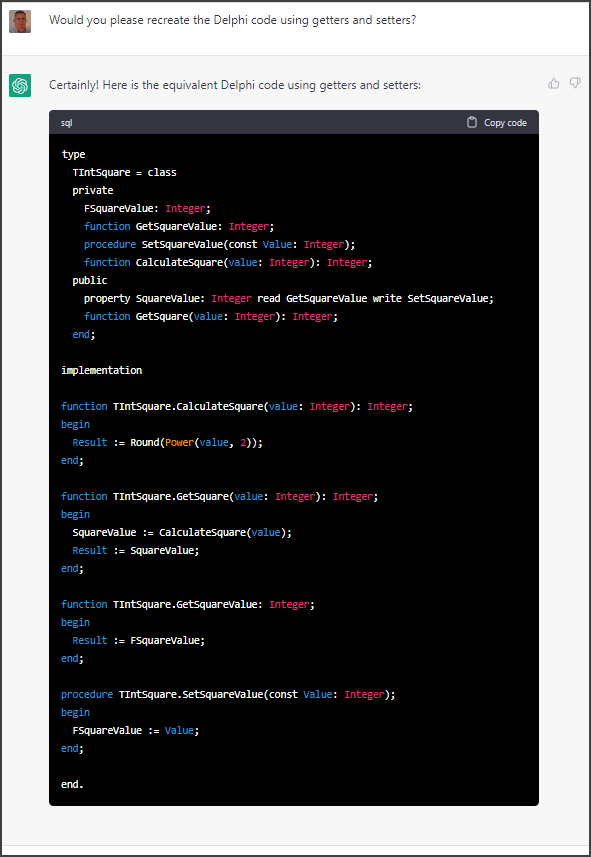
Here is my entire ChatGPT session:
Here is the final output from ChatGPT.
uses
  System.Math;

type
  TIntSquare = class
  private
    FSquareValue: Integer;
    function GetSquareValue: Integer;
    procedure SetSquareValue(const Value: Integer);
    function CalculateSquare(value: Integer): Integer;
  public
    property SquareValue: Integer read GetSquareValue write SetSquareValue;
    function GetSquare(value: Integer): Integer;
  end;

implementation

function TIntSquare.CalculateSquare(value: Integer): Integer;
begin
  Result := Round(Power(value, 2));
end;

function TIntSquare.GetSquare(value: Integer): Integer;
begin
  SquareValue := CalculateSquare(value);
  Result := SquareValue;
end;

function TIntSquare.GetSquareValue: Integer;
begin
  Result := FSquareValue;
end;

procedure TIntSquare.SetSquareValue(const Value: Integer);
begin
  FSquareValue := Value;
end;

end.
Influencing Human Behavior by H. A. Overstreet was published in 1925. I purchased an old hardcover copy of his book over a year ago because, some other book I was reading referred to it as a master work. Overstreet's book has been sitting on my oak book shelf, which was built by a very nice Mennonite man in Maryland, ever since it arrived.
I spent the weekend of November 26th and 27th entering all my "print books" into a software program called Calibre (https://calibre-ebook.com) which by the way, is mainly for managing E-books.
After saving the information from an ISBN import, I began reading. I stopped on page 12 after reading what Overstreet wrote about capturing one's attention using "The Kinetic Technique".
I stopped reading because this piece of wisdom so grabbed ahold of me, I wanted to let it seep into my mind.
Two days later on Tuesday morning at 1:45 AM I woke to a racing mind. "What book talked about a dot on the wall?" I kept searching, and searching my thoughts. Nothing.
"Ah, the influencing human behavior book."
Why was this so important that it woke me up? My website (read that as I) totally violated the principle of movement. Every page on my website has the same big-ass banner. I was making all my visitors (read that as potential customers) stare at a dot on the wall. How boring is that.
I jumped out of bed right then and there and started working on removing the dot from my website. It took me a few days, but I managed to get rid of that dot. But more importantly, I learned a valuable lesson from some ink that was printed nearly 100 years ago.
Thank you Mr. H. A. Overstreet. I can't wait to see what else of yours seeps into my mind.
Influencing Human Behavior - H. A. Overstreet (page 12)
I wanted a quick, down-and-dirty, reference to only those variables used by the Delphi IDE. Inside the IDE you can navigate to Tools > Options > IDE > Environment Variables. This will list all the Environment Variables currently in use. Those belonging to Delph and those outside of Delphi. However, that is not what I was looking for. I just wanted the Environment Variables specific to the Delphi IDE.
Step 1. I entered and ran the code from the above link. I then copied and pasted the contents of the memo to a separate text file called EnVars-Delphi-IDE.txt.
Step 2. I closed Delphi and ran the program again from the saved location. I then copied and pasted the contents of the memo to a file called EnVars-Without-Delphi-IDE.txt.
Step 3. I then navigated to the Delphi BDSBIN location and ran the Beyond Compare utility BCompareLite.exe. I did a text compare of EnVars-Delphi-IDE.txt and EnVars-Without-Delphi-IDE.txt looking only for the differences.
I simply copied all the text from the left-had side and saved it as EnVars-Delphi-IDE-Only.txt. And now I have my quick down and dirty list of Delphi IDE Environment Variables.
Beyond Compare is a fantastic tool written with Delphi. The lite version is included with your purchase of Delphi. For more information about Beyond Compare visit their website:
I've been playing around with the FMX StringGrid for the past three weeks. And I thought...
"Wouldn't it be nice if there was a way to automatically resize the column widths based on the values in each of the columns. Just like the way Excel works when you highlight the entire sheet and double-click the thin line between two columns."
In today's Delphi tip of the day I present a simple routine that evaluates the data in each of the column headings and the columns of each row to determine how wide to make the cells. And the best part is, it automatically adjusts all the columns widths in one go.
"Just like the way Excel works..."
It's fairly straight forward using two for loops. It loops through each column looking at every row and determining the width that column needs to be based on the data in each cell.
procedure AutoAdjustColumnWidths(const Grid : TStringGrid);
var
  col : Integer;  //Grid Column
  w   : single;   //New Width
  s   : string;   //Grid Column value
  l   : Integer;  //Lenght of Grid Column value
  row : Integer;  //Grid Row
  r   : Single;   //Result of TextWidth calculation
begin
  for col := 0 to Grid.ColumnCount-1 do
  begin
    w := 0;
    s := Grid.ColumnByIndex(col).Header;
    l := length(s);
    w := Grid.TextWidthToColWidth(l,s) * 1.05; //add a little padding
    for row := 0 to Grid.RowCount-1 do
    begin
      s := Grid.Cells[col,row];
      l := length(s);
      r := Grid.TextWidthToColWidth(l,s) * 1.05; //add a little padding
      if r > w then
        w := r;
    end;
    Grid.Columns[col].Width := w;
  end;
end;
I'm sure this can be improved upon so it only evaluates the first 50 or 100 rows. I'll leave that up to you to figure out.